

 Get started
 How-to guides
 Reference
 Concepts
 Self-host gallery
 Appendix


Provider credentials
Store a credential once under Settings > Cloud node providers (/settings/node-providers) or with levelrail-cli nodes providers set-credential --provider <name>. Each provider card reads “Not connected” until you save one, and a saved credential is never shown again. It is envelope-encrypted at rest like every other integration credential.
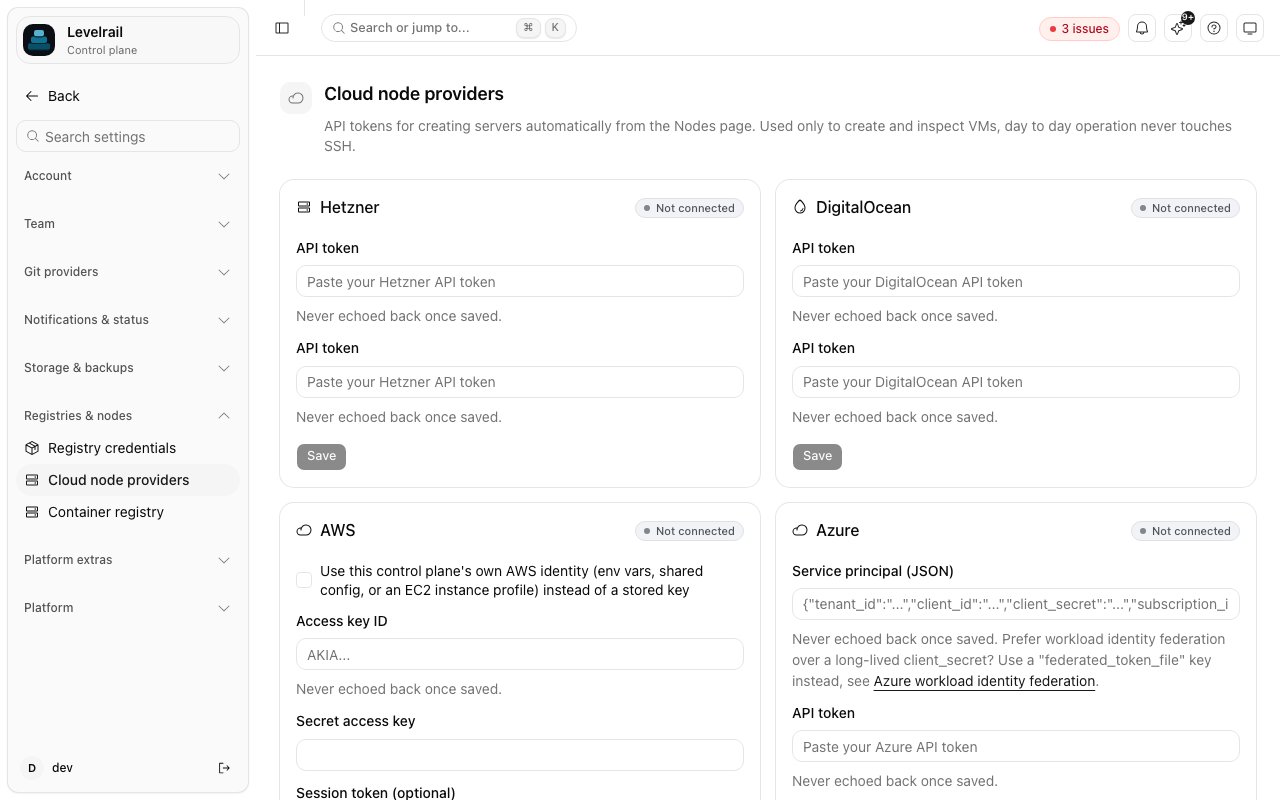
--provider-token is accepted for scripting, but its value lands in shell history and the process list. Pipe the credential instead, or omit the flag for a no-echo prompt:
- Hetzner
- DigitalOcean
- AWS
- Azure
- GCP
A project API token with Read & Write access. Tokens are scoped to one project, and servers are created in that project.
How it works
POST /api/v1/nodes/provision(ornodes provision, or the Nodes page’s Add node wizard) mints a join token through the same code path asPOST /api/v1/nodes/join-tokens, then asks the provider to create a server with a cloud-init script as user-data.- The script installs Docker if the image lacks it (the same
get.docker.comscriptinstall.shuses) and starts the agent as a systemd-managed container. The join token and CA fingerprint go through a root-only environment file, not the container’s command line. GET /api/v1/node-provisions/{id}(ornodes provisions show <id>, or the wizard’s progress view) recomputes status on every call. It asks the provider whether the server is up and checks whether a node with the expected name has enrolled. Status moves throughcreating,booting,enrollingandready, orfailedwith a reason.- Once the node is found, its workload kinds are set from the provision’s
role:generalaccepts apps,buildaccepts builds (see Build node routing). Enrollment itself always starts a node as a plain app node.
409. The name is how step 3 matches a node to its provision.
The agent runs from an image
The control plane binary thatinstall.sh installs is checked against a published checksums.txt. The agent in provisioning is different: cloud-init pulls the container image ghcr.io/glincker/levelrail-agent, one tag per release and cosign-signed by the release pipeline. The pull is a plain docker pull over the registry’s TLS, and cloud-init does not verify the cosign signature before running it. Treat this like any unverified script run on first boot. Later releases also attach a raw agent binary (see Docker), but the provisioning script does not use it.
Token visibility on the node
The join token and CA fingerprint are container environment variables, sodocker inspect levelrail-agent on the node shows them while the container exists. Treat a provisioned node as trusted infrastructure, as you would a manually enrolled one.
Cost
Every provider bills by the hour for as long as the server exists. Provisioning never deletes a server for you. If a provision fails partway, or you stop using a node, delete the server at the provider.levelrail-cli nodes delete <id> removes the node record but not the VM.
Azure and GCP also bill for the networking resources created next to the VM: a public IP on Azure, and an external IPv4 address on GCP. These are small but not free.
The size picker shows a live monthly price for Hetzner and DigitalOcean, because both return it from their APIs. For AWS, Azure and GCP it shows “pricing varies, see provider console”, since those catalogs need a separate pricing API that Levelrail does not call. A build role node benefits from more CPU and memory.
Known limitations
Closing the wizard stops the browser tracking a provision
Closing the wizard stops the browser tracking a provision
The server keeps provisioning. Use
nodes provisions show <id> or GET /api/v1/node-provisions/{id} to follow it. There is no screen yet to reopen the progress view.Azure VMs get no SSH access
Azure VMs get no SSH access
Azure requires a password when no SSH key is supplied, and there is no credential input for one, so a random throwaway password is generated and discarded. The agent enrolls by dialing out, so this does not block provisioning. To SSH into an Azure node, configure access in the Azure console.
Azure deletion relies on cascading
Azure deletion relies on cascading
The VM’s NIC, public IP and OS disk are created with
deleteOption: "Delete", which Azure documents as cascading on VM delete. This was not verified against a real subscription. If it does not behave as documented, a deleted node can leave a NIC and public IP behind.GCP has no federation mode
GCP has no federation mode
Only the service account JSON key is supported. See the GCP tab above.
What was not tested
This feature was built without real cloud accounts. The provider clients ininternal/provision are tested against fake HTTP servers for Hetzner, DigitalOcean, Azure and GCP, and against a hand-written fake of the narrow EC2 interface for AWS. Azure and GCP were never run against a real subscription or project, so their full resource chains are unverified end to end. AWS default-VPC lookup, image resolution, security group handling, and the STS and ambient-credential paths are only as correct as their fakes.
Before relying on this in production, provision one real node per provider and confirm it reaches ready.
See also
Multi-cloud quickstart
The three-command version.
Multi-node
Placement, drain, certificates and the mesh.