How Levelrail’s “what this would cost elsewhere” app cost estimate is calculated, its assumptions, and the env vars that let you correct the reference rates for your own region.
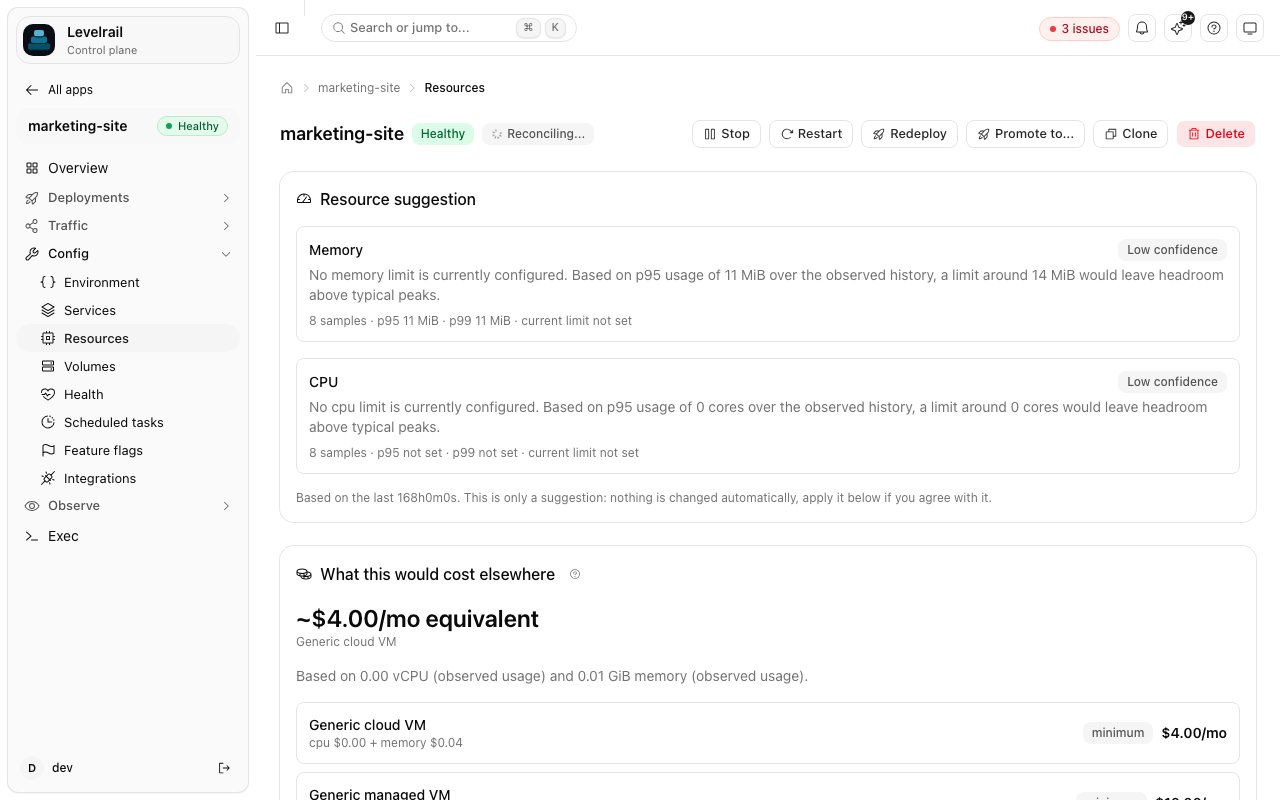
An app’s Resources tab shows what it might cost per month under three reference pricing profiles. Look for What this would cost elsewhere, folded at the bottom of the Optimise panel.
This is an estimate, not a real bill. It never calls a live pricing API and does not reflect what your own hardware costs. It shows roughly what the same CPU and memory would cost under typical metered cloud pricing, so you have something to compare against.
CPU and memory are resolved independently, in this order:
Declared: the app has a memory or CPU limit in its resources: block (or set through the API or CLI).
Observed: no limit, but enough usage telemetry exists. The estimate uses the p95 of CPU and memory over the last 7 days, the same window the resource recommendation feature uses.
Unavailable: neither exists yet. You still get a response, priced at each provider’s minimum, and the basis fields say there is nothing real behind the number.
Each rate can be overridden on the control plane with APP_COST_ESTIMATE_<KEY>_CPU_USD, APP_COST_ESTIMATE_<KEY>_MEMORY_USD and APP_COST_ESTIMATE_<KEY>_MINIMUM_USD, where <KEY> is the uppercased key from the table (VM, MANAGED_VM, PAAS).


 Get started
 How-to guides
 Reference
 Concepts
 Self-host gallery
 Appendix