

 Get started
 How-to guides
 Reference
 Concepts
 Self-host gallery
 Appendix


What this covers
Create a Postgres, Redis, MySQL, MongoDB, MariaDB, KeyDB, Dragonfly, or ClickHouse database from the dashboard, the CLI, or the API. Levelrail runs it, generates its credentials, and can back it up on a schedule. A database is managed like an app, minus the build step and domain routing. It has its own data volume that survives redeploys and its own lifecycle (stop, start, upgrade, restore).Create a database
- CLI
- API
- Dashboard
--node-id pins a node. Without it the database is placed on the least-loaded registered node, or the local node if there is only one. --interactive also prompts for resource limits, public access, and a backup schedule. Check the result with levelrail-cli databases get main or levelrail-cli databases status main.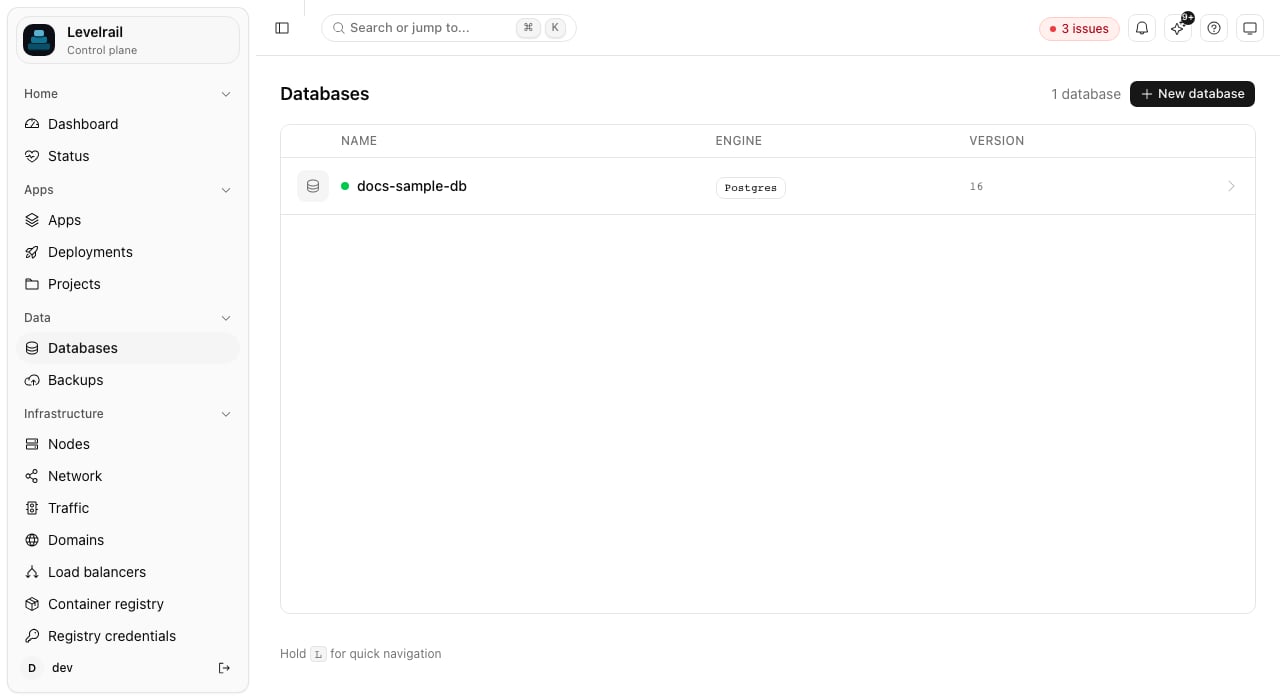
Placement
Omitnode_id at creation to let the control plane pick a node, or pass it to choose one. To move an existing database, use levelrail-cli databases set-node <name> <node-id> (or PUT /api/v1/databases/{name}/node), and databases clear-node <name> to move it back to the local node. Placement is fleet-level infrastructure, so it needs the root ability.
Supported engines
GET /api/v1/database-engines serves the live list, which the dashboard’s creation wizard and databases create --interactive read.
Postgres with pgvector
A Postgres version written<major>-pgvector (for example 17-pgvector) runs the pgvector/pgvector:pg17 image, so CREATE EXTENSION vector works. The engine stays postgres: backups, point-in-time restore, TLS, the database viewer, data copy, and the guarded major upgrade all behave the same. Only <major>-pgvector with Postgres 13 or newer is accepted; anything else mentioning pgvector is rejected with a 400.
- Plain to pgvector:
databases major-upgrade <name> --version 17-pgvector(dump and restore, works for the same major too), or restore a backup into a new database with--version 17-pgvector. - pgvector back to plain: refused.
Stop, start, and delete
- CLI
- API
suspended flag without touching the data volume. The reconciler removes or recreates the container against the same volume. On the dashboard they are one-click actions in the database page header, with no confirmation because neither is destructive.
Delete stops and removes the container and the database record, but keeps the data volume (db-<name>-data) and every backup in your storage destination, so a mistaken delete never destroys data. The CLI’s --delete-data flag (with --confirm NAME) also destroys the data volumes.
If apps still connect to the database, delete is refused with a 409 naming them. The dashboard then offers “Delete anyway” and the CLI takes --force.
Reusing a name after a delete
Because the data volume survives, a new database with the same name would find the old data. The create is refused with a409 (code: "existing_volume", listing the volumes and their sizes) until you choose what to do with it:
The check covers the control plane’s own node only. A volume left on a remote node is not inspected, so remove that one yourself. Restore-as-new into a name with a leftover volume is refused the same way.
Attach a database to an app
Attach an already-created database to an app withPUT /api/v1/apps/{name}/database. The reconciler injects the resolved value as an env var the next time the app’s container is created. You do not need an app.yaml env var of the form { from: "<database>.<field>" } to do this.
Fields are validated against the engine before saving: Redis, KeyDB, and Dragonfly do not support
username or database. DELETE /api/v1/apps/{name}/database stops injecting the env var into newly created containers and does not touch containers already running.
On the dashboard, use the Database card on the app’s Overview page. Its “Env var / field options” disclosure covers anything past the URL default.
Backups
Every backup, restore, and verify action for a database goes through a backup target: a connected S3-compatible bucket whose access key is stored through the same envelope-encrypted secrets path as any other credential. Create one under Settings, Backup targets or withlevelrail-cli backup-targets create (see Backup targets) before anything below works. Every backup, restore, and verify endpoint returns 501 if the control plane has no master key configured.
Back up now
POST /api/v1/databases/{name}/backups records the attempt, starts the dump and upload in the background, and returns 202 Accepted right away rather than when the work finishes. The handler runs the backup against its own background context, not the request’s, because the request context is cancelled the moment the handler returns. Poll backups list (or GET .../backups) for the result.
507 when the control plane’s data directory has less than APP_MIN_BACKUP_DISK_MB free (default 256), because the backup history row is written there.
Scheduled backups
PUT /api/v1/databases/{name}/backup-schedule stores a target, a standard 5-field cron expression, and retention settings. retain keeps the last N successful backups and retain_days deletes anything older than N days. They are independent, and 0 means no limit. See Retention.
The cron expression is validated when you set it, so a typo is a 400 instead of a silently skipped tick. A scheduler inside the control plane evaluates every schedule on its own tick, and nothing else needs to be running. On the dashboard, use the schedule form at the top of the Backups card.
Every scheduled backup that succeeds is automatically re-verified right after. The verification badge shows “Auto-verified” or “Failed auto-verification” with checked_by: "scheduler". Manual backups get no automatic follow-up, so verify those yourself.
If the control plane is down when a scheduled backup should fire, that run is missed. It is not queued or replayed on restart.
Restore in place (destructive)
--confirm <name> to skip the prompt: a script without both --confirm and a terminal is refused. The dashboard’s restore dialog keeps its button disabled until the text matches. Only a succeeded backup can be the source, and the server returns 409 for a running or failed attempt.
levelrail-cli backups restores <database>.
Restore as new (non-destructive)
POST /api/v1/databases/{name}/restore-as-new creates a brand-new database and restores the backup into it, never touching the source’s live data. Use it to test a migration or stand up a staging copy. The new database inherits the source’s engine, and its version unless you pass --version. It needs write:sensitive, not root, because the worst case is an extra database you can delete like any other.
levelrail-cli backups clone-restores <database> lists them on the CLI. A failed restore-as-new leaves the new database in place in whatever state the failure left it: delete it and retry.
Restore safety checks
A Postgres restore replays the dump in one transaction withON_ERROR_STOP: a failing statement rolls everything back and the restore reports failure, so a damaged or partial dump leaves existing data untouched.
Before any restore (in place or restore-as-new), the stored object is hashed in a first pass and compared with the checksum recorded at backup time. A corrupted object is refused with object is corrupted and the database is not touched. Backups taken before checksums were recorded skip that pass. Restore-as-new, and in-place restore into a freshly created container, also wait until the server accepts TCP connections, so a restore does not race a database that is still initialising.
Verify a backup
POST /api/v1/databases/{name}/backups/{historyId}/verify re-downloads the stored object and checks it for corruption. Like trigger and restore, it returns 202 immediately and does the work in the background. Use backups verifications or the badge on the dashboard to see results.
The checks are:
- checksum match,
- size match,
- a lightweight structural check: the RDB header for Redis-family engines, and the completion trailer that
pg_dump,mysqldump, andmariadb-dumpwrite last, so a truncated dump fails.
Download or delete a backup
GET /api/v1/databases/{name}/backups/{historyId}/download streams the stored object straight through without buffering, so large dumps are never held whole in memory. It needs read:sensitive, one tier above the metadata-only read that lists history, because the body can be an entire production database. Only a succeeded backup can be downloaded. On the dashboard, use the Download button next to Restore.
Deleting removes the stored object and its history row and does not touch the schedule. See Delete one backup on demand.
Point-in-time restore (Postgres only)
Every restore above is snapshot-based: it returns the database to the moment a specific backup (a logical dump) was taken. Point-in-time restore can put a Postgres database back to any exact timestamp, down to the second.1
Enable continuous WAL archiving
pitr enable <database> turns on wal_level=replica and archive_mode=on going forward. Postgres only.2
Take a physical base backup
pitr base-backups trigger runs pg_basebackup, the floor a restore replays WAL forward from. Take one periodically: the more recent the latest base backup, the less WAL a restore replays.3
Check the recoverable window
pitr status <database> reports the oldest succeeded base backup’s timestamp on one end and the latest instant WAL archiving has provably reached on the other, forced fresh on every call.4
Restore to a timestamp
pitr restore <database> --base-backup ID --target-time RFC3339 extracts the base backup, replays archived WAL, and stops at the first transaction commit after --target-time.pitr restore has the same “type the database’s exact name” gate as backups restore (--confirm, or an interactive prompt) and the same root ability, because it is exactly as destructive. A target timestamp outside the recoverable window is rejected with a 409 before anything is touched.
On the dashboard, the Overview page has a Point-in-time restore card, separate from the Backups card: an Enable/Disable toggle, the current recoverable window, base backup history with a manual trigger, and a Restore to timestamp dialog whose datetime picker is bounded to the recoverable window.
Why the database goes offline during a restore
A point-in-time restore replaces Postgres’s own data directory, which cannot happen while the server is running against it. The control plane stops the container, wipes and repopulates its data volume from the base backup, and lets the reconciler bring it back once recovery is configured. A restore therefore takes longer than an in-place logical restore, in proportion to how much WAL there is to replay, not to the database’s size.WAL retention and disk use
Postgres copies archived WAL into the database’swal-archive Docker volume on the same host. The control plane then ships it to the backup target of the newest base backup, under <database>/wal/ next to the base backups.
- Shipping runs every minute (
APP_PITR_WAL_SHIP_INTERVAL, a Go duration,0disables it) and straight after every base backup, which first forces the current segment out. A segment still being written is never shipped, and an object already in the bucket at the same size is skipped.pitr statusshows when WAL was last shipped and the last error, on the CLI and the dashboard card. - A restore pulls the shipped WAL back into the archive volume before it touches the database, so it works even after the database host’s disk is lost.
- After every successful base backup the control plane keeps the newest
APP_PITR_BASE_BACKUP_KEEP(default 3) base backups, deletes older ones and their bucket objects, and removes archived WAL older than the oldest remaining base backup, on the host and in the bucket. A base backup that a point-in-time restore record references is kept. - When a database has a backup schedule, each scheduled backup of a PITR-enabled database is followed by a base backup, so there is no second schedule to set up. Without a schedule, base backups are manual.
- The data loss window after a disk failure is up to one shipping interval of WAL, plus any segment Postgres has not archived yet.
- Shipping covers databases on the control plane’s own node only.
- An object that exists at the same size is never re-uploaded. After a total host loss, a re-initialised cluster reuses segment names, and the bucket keeps the original lineage, which is what a restore wants.
- If the bucket is unreachable, shipping fails visibly in
pitr statusand local WAL keeps accumulating on the host.
Public access
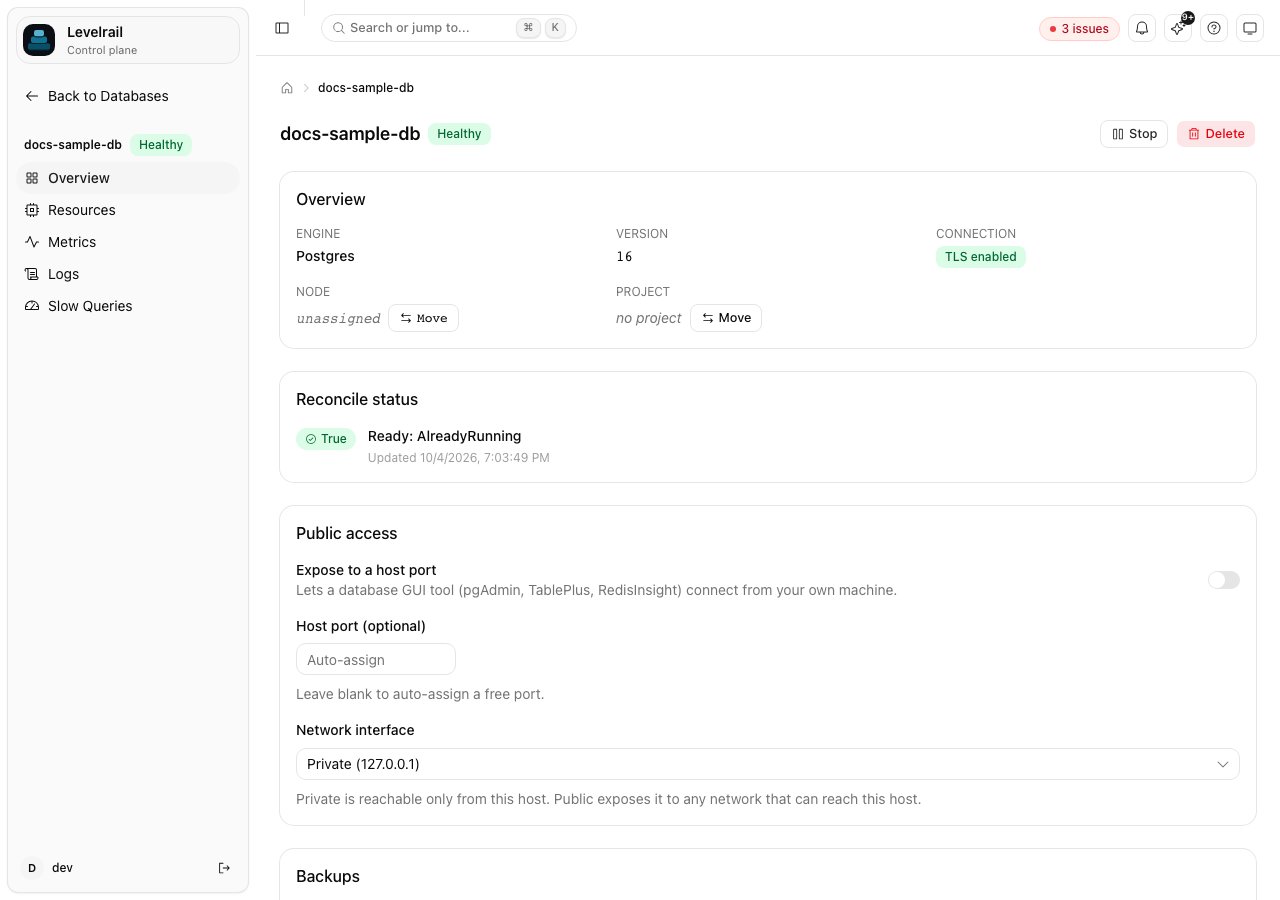
By default a managed database is reachable only from the platform’s Docker network. Public access binds it to a host port so you can use pgAdmin, TablePlus, RedisInsight, or similar tools from your machine.- CLI
- API
- Dashboard
- Leave
portat0or omit it to auto-assign the next free port. - A specific port must be in
1024-65535. The reserved ports80,443,8080, and9443are rejected. - Changing the port while access is already enabled is a state change.
bind_address chooses which interface the port binds to: private (loopback only, the default when omitted), public (every interface, an explicit opt-in), or a literal IP address. See Bind addresses and exposure for the full rules. A database that was already public before this field existed keeps that exposure (backfilled to public). Re-enabling later without an explicit bind_address uses the private default.
Clearing public access reverts to internal-only, and the reconciler replaces the container without the host port binding on its next pass.
Resource limits
Set memory, CPU, swap, and CPU pin (cpuset) with PUT /api/v1/databases/{name}/resources. Omit a field or set it to null to clear it.
resources_applied_live field says which happened.
GET /api/v1/databases/{name}/resource-recommendation suggests memory and CPU from the database’s historical usage, the same feature as for apps. On the dashboard, the Resources tab has a recommendation card above the limits editor.
TLS
Postgres and Redis get TLS enabled automatically at creation, with a self-signed certificate generated once and persisted through the secrets mechanism. There is no operator toggle: TLS shows as on once a certificate exists for the database. The other engines connect in plaintext inside the Docker network. Both engines have an “encrypt without verifying” mode in their standard connection URI (Postgressslmode=require, Redis rediss://), which mainstream client libraries honor with no app-side change. When an app attaches to a TLS-enabled database, it automatically gets the TLS form of the connection string: ?sslmode=require appended for Postgres, or rediss:// on the TLS-only port for Redis. Nothing in app.yaml opts into this.
Certificate details
Certificate details
The certificate is self-signed ECDSA P-256 and valid for ten years. It is never presented to a party that verifies its issuer, so rotation is a deliberate operator action, not forced by expiry. It is ECDSA rather than ed25519 because libpq’s SCRAM channel binding fails on an ed25519 certificate, which broke
psql, psycopg2, and other libpq clients using the default sslmode=require URL. Databases created by an earlier release get a new certificate and are recreated once, automatically, the next time the reconciler sees them.Change the version
PUT /api/v1/databases/{name}/version (dashboard: Change next to the version on the Overview tab) swaps the image tag. The container is stopped and recreated over the same data volume, so take a backup first.
For a Postgres major upgrade, use the guarded flow below. For the other engines, back up, then restore into a new database on the new version with
backups restore-as-new. To see which patch and minor releases are available, which fix CVEs, and to apply them automatically in a maintenance window with a backup first and an automatic revert, see Database upgrades.
Postgres 18 and newer images moved their default data directory outside the path this platform mounts, which would lose data on any container recreate. For version 18 and above the controller pins
PGDATA back to the mounted path.Postgres major version upgrade
- CLI
- Dashboard
1
Preflight
Checks free space in the data directory and that the target image can be pulled. A version that does not exist fails here, before any downtime.
2
Suspend
The database stops cleanly.
3
Snapshot
The data volume is copied to
db-<name>-data-pre<major>-<id>.4
Dump
A temporary container on the old version starts on that snapshot, which proves the snapshot boots and makes the dump consistent.
pg_dump and a per-table row count are taken from it. A dump without the pg_dump completion marker is refused.5
Wipe, upgrade, restore
The live volume is emptied, the version is changed, the reconciler starts the new version, and the dump is replayed in a single transaction.
6
Verify
The server must report the target major, and every public table’s row count must equal the old cluster’s.
rolled_back. If a control plane restart interrupts an upgrade, it settles the attempt the same way on the next start. If a rollback itself fails, the attempt is marked failed with the snapshot volume’s name, and that volume is left intact.
After a success the snapshot is kept so major-upgrade-rollback can undo the upgrade (every write since is lost) until you run major-upgrade-discard to free the disk. A recorded snapshot volume is protected from orphaned volume cleanup.
Limits:
- Roles other than the database’s own user are not part of a single-database dump. Objects owned by another role make the restore fail, which rolls back safely, but the upgrade cannot proceed until that ownership is changed.
- Only the
publicschema’s tables are counted in verification, matching what restore recreates. - It is refused while point-in-time restore is enabled, because its base backups and WAL cannot be replayed on another major version. Disable it, upgrade, enable it again, and take a new base backup. Downgrades across a major are refused.
- It needs free disk for the snapshot (the data volume’s size again) on the Docker host, plus the dump file in the data directory. A copy that runs out of disk fails before the wipe and changes nothing.
- Apps connected to the database see downtime for the whole run.
- Each wait (a container stopping, starting, accepting connections) is bounded by
APP_MAJOR_UPGRADE_WAIT, a Go duration defaulting to 5 minutes. Raise it for a large cluster that needs longer crash recovery. - Postgres only. The other engines use backup and restore-as-new.
Engine notes
ClickHouse
ClickHouse
Backups are DDL plus rows as SQL. The image’s entrypoint puts
CLICKHOUSE_DB and CLICKHOUSE_USER into unquoted SQL, so the controller passes a sanitized form of the name (hyphens and dots become underscores). A database named web-db therefore uses web_db inside ClickHouse. The dump strips the source database’s name from each table’s DDL so restore-as-new works into a database with a different name. Backups taken before that fix restore only into a database with the same ClickHouse identifier.KeyDB and Dragonfly
KeyDB and Dragonfly
Backups are RDB snapshots. Dragonfly starts one io thread per CPU and refuses to start when the threads times 256MiB exceed the available memory, which a many-core host with little RAM can hit and loop on forever. Set
APP_DRAGONFLY_PROACTOR_THREADS (for example 2) on the control plane to cap it for Dragonfly databases created or recreated afterward. An existing container keeps the command it was created with: remove it so the reconciler recreates it (the data volume is kept).Redis, KeyDB, and Dragonfly authentication
Redis, KeyDB, and Dragonfly authentication
These run passwordless by default, so
username and database fields do not apply, and public access needs the explicit confirmation described above.Slow query log
Slow query logs capture individual statements over a duration threshold, so you can find expensive queries before they cause an incident. They are available for Postgres and MySQL only. Redis has no log-based slow query record, and other engines return an error. For browsing schemas and rows or running ad hoc read-only SQL, see Database viewer. Postgres reads slow statements from the container’s own log stream. MySQL reads the slow log file from the running container (/var/log/mysql/slow.log) and is configured with slow_query_log=ON at creation. The threshold is 1000 ms by default. Set APP_DATABASE_SLOW_QUERY_THRESHOLD_MS on the control plane to change it. Results are sorted by duration, longest first, 100 per page by default (maximum 500).
- CLI
- Dashboard
- API
--since DURATION: how far back to search (default1h).--fromand--to: an RFC3339 window.--fromoverrides--since, and--todefaults to now.--limit Nand--offset N: pagination (default limit 100, maximum 500).
No slow queries in the results?
No slow queries in the results?
- Postgres: the statement must have exceeded the threshold. Faster queries never appear, however wide the window.
- MySQL: the slow log file exists only after at least one slow statement has run. A new or never-slow database returns an empty result.
- Either engine: if the container is stopped or crashed, nothing new is logged.
Reference
API
CLI
databases subcommand: use backups schedule set, or the databases create --interactive wizard at creation time.
Known limits
- Deleting a backup target leaves its stored credentials in the secrets store, unreferenced but not erased at rest.
- A scheduled backup missed while the control plane is down is not replayed on restart.
- Physical base backups for point-in-time restore are manual unless the database has a backup schedule, which triggers one after each scheduled backup.
- TLS is Postgres and Redis only, with no operator toggle.
Next steps
Connecting apps to databases
Connect an app to several databases and read reachability badges.
Backup targets and storage
Retention, volume backups, and registry credentials.
Database upgrades
Patch and minor upgrades in a maintenance window, with backup and revert.
Identity and access
How the
write:sensitive and root abilities are granted.App spec reference
Bind address rules and
{ from: "<database>.<field>" } env vars.Database viewer
Browse schemas and rows, or run read-only SQL.