

 Get started
 How-to guides
 Reference
 Concepts
 Self-host gallery
 Appendix
How do I install Levelrail and deploy my first app?
Outcome: a running Levelrail control plane on your Linux server and your first app behind HTTPS, in about 10 minutes. Run one command as root, open the dashboard link it prints, choose a password, and deploy from a template or a Git repository. Each app gets a health check, logs, metrics and rollback.Pick your install path

One command on a Linux server
About 10 minutes. Fits a VPS or a home server you can SSH into.

On a cloud VM
About 10 minutes. Fits AWS, Google Cloud, Azure, DigitalOcean or Hetzner, with boot scripts and firewall ports.

Add a remote node over SSH
About 5 minutes once a control plane runs. Fits a second server you can SSH into. Beta.

With Docker
About 5 minutes. Fits hosts that already run everything as containers.

From mainland China
About 15 minutes. Fits networks where github.com, ghcr.io or Docker Hub are slow or blocked.

With an AI agent
About 10 minutes. Fits Claude Code, Cursor or any agent that can run shell commands over SSH.
The shortest path
1
Install
Run the installer as root on the server. Steps and checks are in 1. Install.
2
Open the dashboard
Open the setup link the installer prints, through an SSH tunnel if port 8080 is closed. See 2. Open the dashboard.
3
Log in
Choose the admin password on the setup page. Back up
/var/lib/levelrail-data/master.key now.4
Deploy your first app
Pick a template or paste a Git URL. See 3. Deploy a one-click template and 4. Deploy from Git.
5
Add a domain with HTTPS
Point an
A record at the server and attach the domain. See 5. Add a domain with HTTPS.Before you start: a Linux server (
amd64 or arm64, systemd, root access, 1 vCPU and 1 GB RAM boots it, 2 vCPU and 2 GB is more comfortable), ports 80 and 443 free and reachable, and port 8080 kept closed to the internet. A domain is optional. Another proxy on 80 and 443 puts the installer in coexist mode, where one-click HTTPS does not work, see Server already runs a proxy. Dashboard access without opening 8080 is in Dashboard port 8080. Full requirements: Installing.1. Install
Levelrail vX.Y.Z installed and running. and a dashboard link. The installer checks the host, installs Docker if it is missing, downloads the newest release and verifies its checksum, starts the levelrail systemd service, and waits until it is healthy.
Back up /var/lib/levelrail-data/master.key now. Every stored secret is encrypted with it, and nothing can recover it if it is lost.
Verify it works:
/healthz answers and the service is active (running). If the dashboard port was taken, use the port the installer printed.
2. Open the dashboard
The installer prints two ways in. The SSH tunnel works even when only ports 80 and 443 are open:http://127.0.0.1:8080/login#setup=<token> link from the installer output. The direct http://<server-ip>:8080/... link works only if port 8080 is open to you. If 8080 was taken, the installer picked the next free port and printed it, so use the printed port in the tunnel command.
Expected: a page asking you to choose a password. After that you are the admin and land on the dashboard. The token travels in the # fragment, so it never reaches server logs or a referrer header.
If the setup link does not work
If the setup link does not work
Print a new setup token on the server. The installer does not print the token when its output is not a terminal (for example in cloud-init), so this is also the way to get it then:Enter the token on the sign-in page. To create the first admin from a terminal instead, set
APP_SETUP_TOKEN to it, set APP_ADMIN_PASSWORD (or answer the prompt), then run levelrail-cli setup admin --api-url http://127.0.0.1:8080. It is refused once an admin exists.The dashboard port is in the systemd unit: systemctl cat levelrail | grep APP_HTTP_ADDR.3. Deploy a one-click template
In the dashboard, open Get started and choose Browse templates under “From a template”, or open Apps, New app, Browse templates. Pick a card, review the pre-filled Compose body, and deploy. There are hundreds of entries, listed in the template catalog. From a terminal on the server:https://<app>.<dashed-ip>.sslip.io once HTTPS is on (step 5). levelrail-cli open my-status-page prints its addresses. Templates with settings use levelrail-cli templates install <id>. See Templates and registry.
Want the quickest proof first? Deploy sample app on the same Get started page runs a small image with a health check in one click.
4. Deploy from Git
In the dashboard, choose New app and paste a repository URL. Levelrail shows a deployment plan before it creates anything: build method, port, environment variables, volumes and warnings. Confirm it, and the build log streams live. From a terminal (on the server, or anywhere you have runlevelrail-cli login, see Use the CLI from your laptop):
docker run commands, compose files and Dockerfiles, see Importing apps.
Other routes:
- Built image
- Config file
- From your computer
--port is the port the container listens on. To build from source instead, pass --repo <url>, or run apps create inside a git checkout that has an origin remote.Check that it is running
apps status lists the reconciler’s conditions, each with a reason, so a failed deploy says why. open prints the custom domain first, then the automatic URL. In the dashboard the same app shows live metrics with deploy markers, the deploy history, and a log viewer with search.
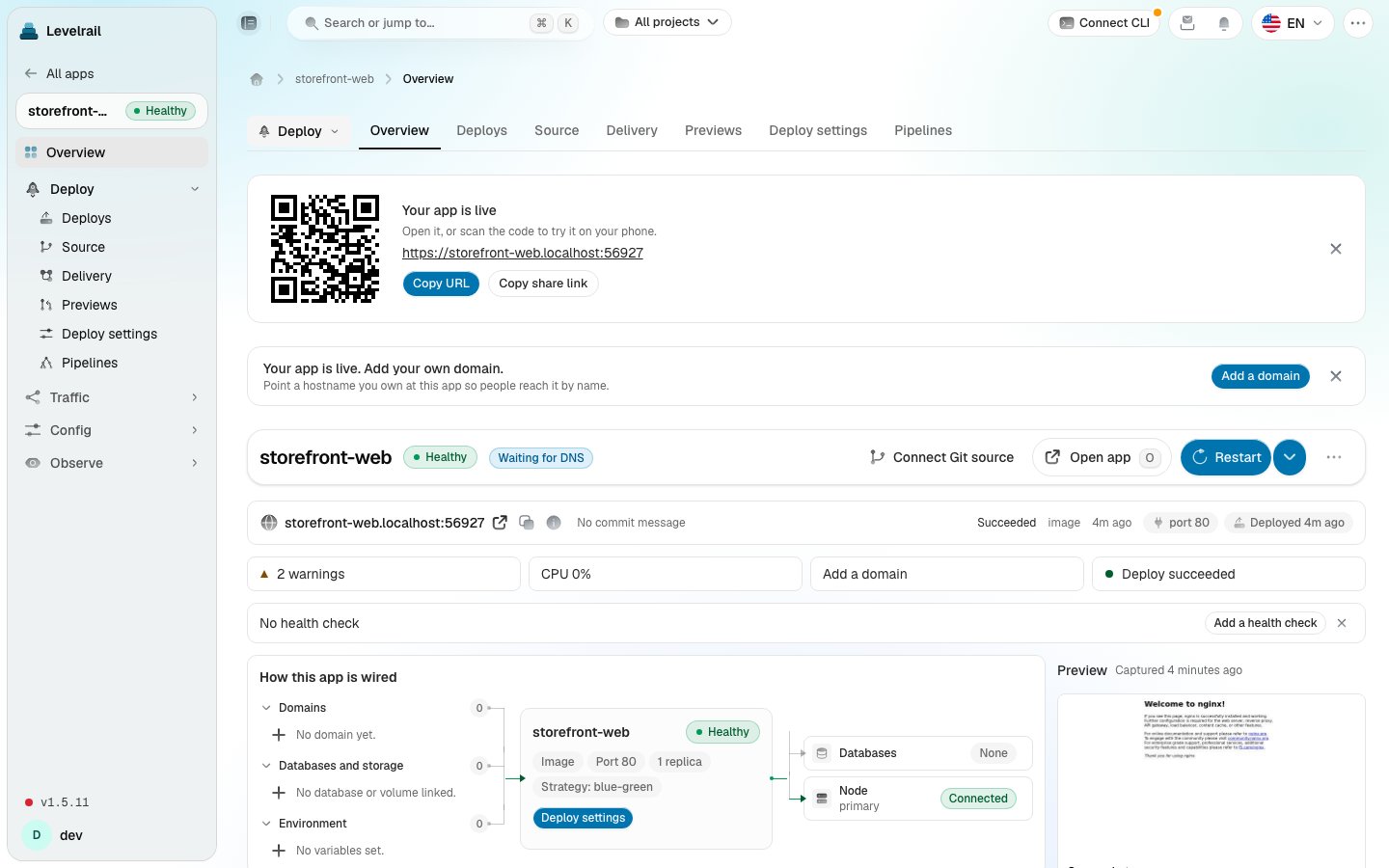
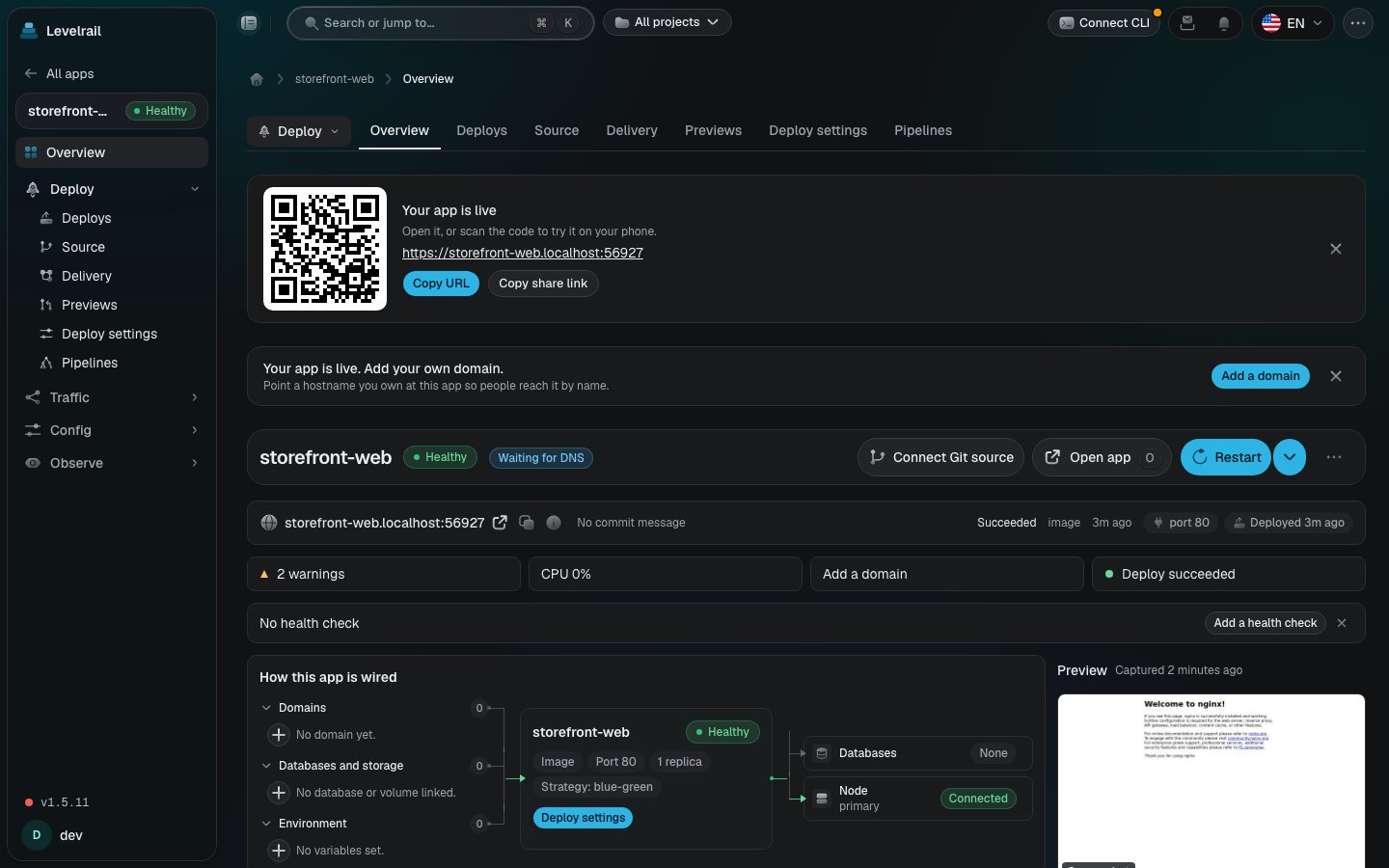
apps status names the failing condition:
- Health check failed. The app did not answer on the readiness path. Check that the path returns a 2xx status and that the app listens on the port you set.
- Container crashed. Read
levelrail-cli apps logs webfor the last lines before the exit. - Missing environment variable. Add it with
levelrail-cli env set web NAME=value --apply.
levelrail-cli apps diagnose web. See Deploy failures for each failure code.
Roll back
Use the deploy history in the dashboard, or run:levelrail-cli rollback web. Earlier images stay pinned, so cleanup cannot remove a rollback target.
5. Add a domain with HTTPS
First, turn on HTTPS for the dashboard with no DNS: press Enable HTTPS on the dashboard banner or the Domains page, or run:<dashed-ip>.sslip.io address with a Let’s Encrypt certificate. This is a test address that works only while your DNS resolver answers for sslip.io, so use your own domain for production. Enabling is capped at 5 attempts per hour. After HTTPS is on, signing in over plain HTTP stops working, so use the https address from then on.
Then create an A record for your domain pointing at the server’s public IP, and attach it to the app:
Troubleshooting the first run
More: Troubleshooting, Installing: Troubleshooting and the FAQ.
Use the CLI from your laptop
levelrail-cli runs on your own machine. It talks to the control plane over HTTPS, so you need no SSH key and no open port.
--api-url (or set APP_API_URL) on the first login. To manage a second server, add --profile NAME to the login and to every later command for that server; without it the login uses the default profile, which is pinned to the first server it saw (a different server is refused until you pass --reauth).
Right after setup, the dashboard home shows a Connect your CLI card. Press Show my command and paste the one line it prints into your terminal. The code is single use, expires in minutes and is only ever shown to a signed-in dashboard session, so it signs the CLI in with no password and no approval step:
levelrail-cli login --api-url https://console.example.com), a new device needs approval from a browser where you are signed in. The CLI tells you exactly where:
--open, or --open=false to turn it off); over SSH and in scripts it does not. In a script it stops at once with the same instructions on one line, unless you pass --wait. Change the wait with --approval-timeout or APP_LOGIN_APPROVAL_TIMEOUT. login --device still works when you prefer to start from the CLI and approve in the dashboard. For CI, create an API token under Settings, API tokens and set it as APP_API_TOKEN.
No git remote yet? Run levelrail-cli deploy in the project folder to upload and deploy it directly, see Deploy from your computer.
Finish setting up for real use
After you sign in, the dashboard home shows live stats, recent activity, and a Needs attention list built from the same server checks aslevelrail-cli doctor.
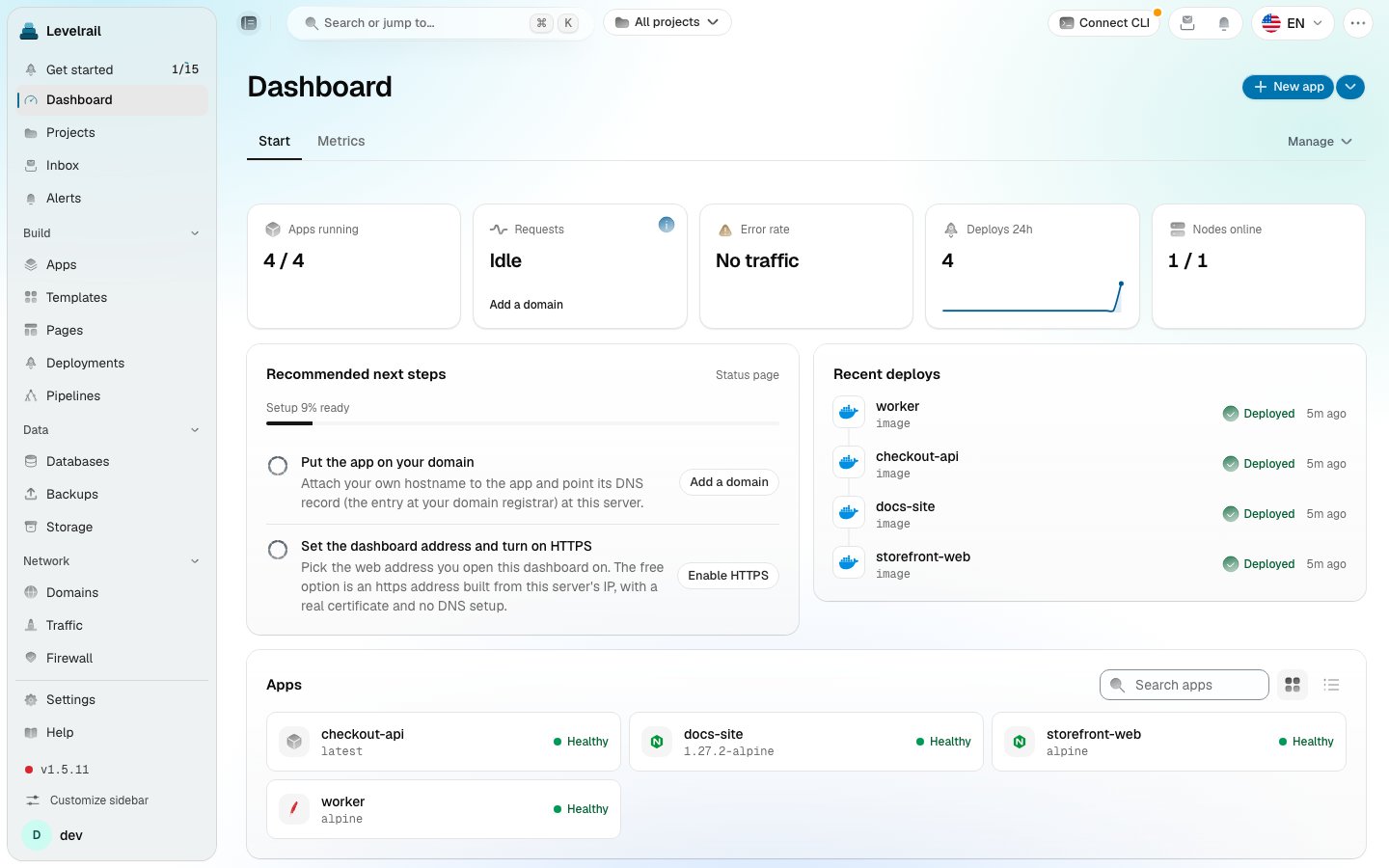
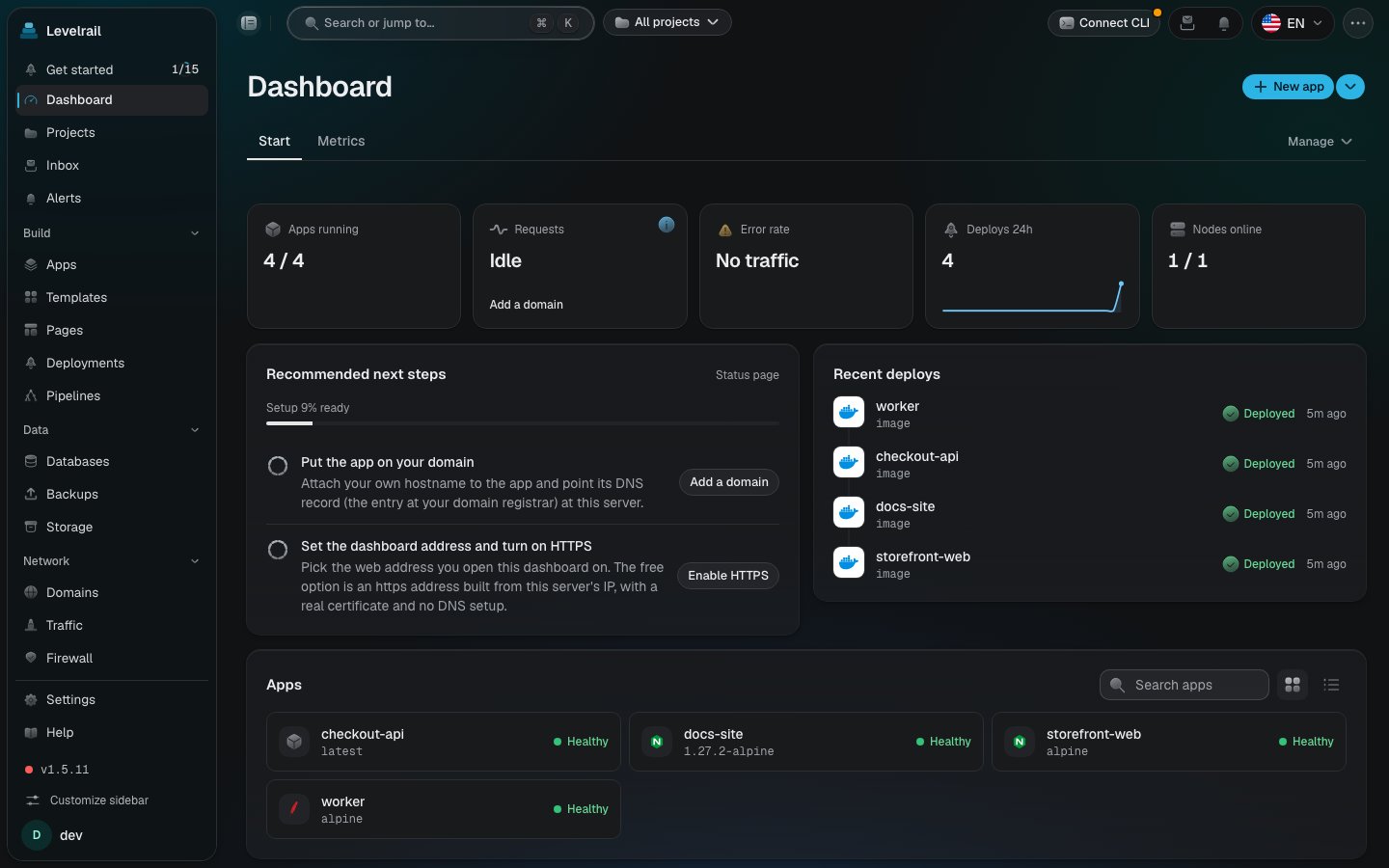
You can Skip a step, Mark done for something the checklist cannot detect, and Undo either. Steps that do not apply to you, such as TLS behind your own proxy, show as “Not needed” and do not count toward your readiness score.
The same checklist works from a terminal:
master.key are the two things you cannot recreate. The shortest path is First backup in 5 minutes.
What next
- Features: what Levelrail does and what is stable.
- Observability and the alert inbox: get told when something breaks.
- Backups and storage: your control plane database and
master.keyare the two things you cannot recreate, so back them up before anything else. - Multi-node quickstart: add a second server.
- Managing databases: run Postgres, Redis or another database next to your app.
- FAQ and Feature status.
--output, --query) and shell completion option is in the CLI reference. To build from source or run a development instance, see Installing.