> ## Documentation Index
> Fetch the complete documentation index at: https://docs.levelrail.com/llms.txt
> Use this file to discover all available pages before exploring further.
# Public status page
> An opt-in public status page with operator-chosen components, 90 day uptime bars, incidents, maintenance announcements and an RSS feed.
The control plane can serve a read-only status page for your users. It is off until you turn it on. It lists only the components you choose, under public names you choose, and nothing else.
## What it shows
* An overall banner: all systems operational, degraded performance, service disruption, or maintenance in progress.
* Each component with its current status and a 90 day uptime bar (one bar per UTC day).
* Active incidents and recent resolved ones (14 days), with their timeline of updates.
* Scheduled and in-progress maintenance, and recently completed maintenance (14 days).
* Links to an RSS feed and a JSON version of the same data.
The page is server-rendered HTML with no JavaScript. It works in light and dark mode and is usable with a keyboard and a screen reader: status is always written as text as well as color, and each uptime bar has a text label.
## What it never shows
The public view is a fixed whitelist: page title and description, component public names, statuses, uptime numbers, and the incident and maintenance text you write. It never includes component targets (app names, hostnames, health check URLs), error messages, IDs of internal resources, node names or metrics. A privacy test fails the build if someone adds a field to the public payload without review.
Incident and maintenance text is escaped. Only paragraphs, line breaks, `- ` lists, `**bold**`, `` `code` `` and `http(s)` links are formatted; raw HTML is shown as text.
## Set it up
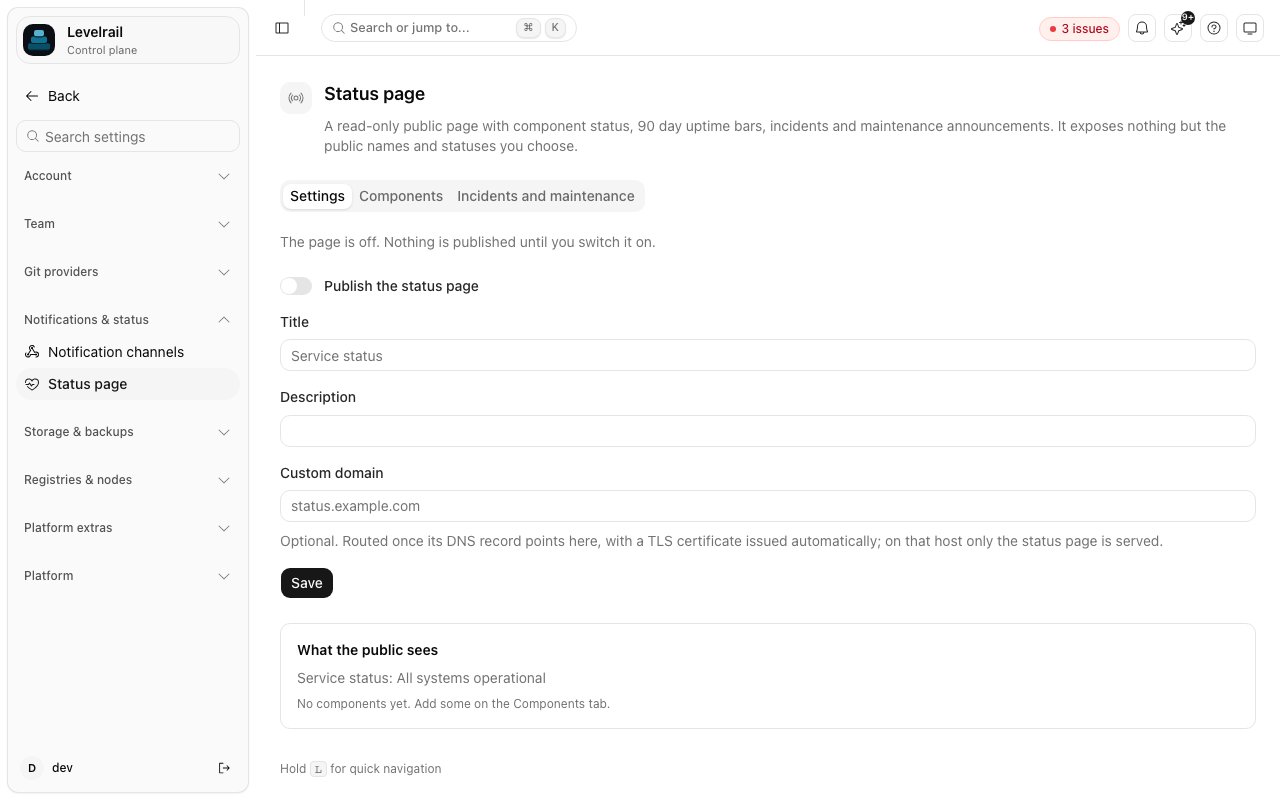 Open **Settings, Status page**, switch the page on, set a title and description, and add components.
```bash theme={"dark"}
levelrail-cli status-page set --enable --title "Acme status" --description "Live service health"
levelrail-cli status-page components add --kind app --target web --name "Website"
levelrail-cli status-page components add --kind domain --target example.com --name "Marketing site"
levelrail-cli status-page components add --kind check --target https://api.example.com/health --name "API"
levelrail-cli status-page preview
```
The page is then served at `/public/status` on the control plane host, with `/public/status.json` and `/public/status.rss` next to it.
### Component kinds
| Kind | Target | How its status is measured |
| - | - | - |
| `app` | an app name | the app's reconcile conditions: healthy is operational, reconciling is degraded, attention needed or stopped is an outage |
| `domain` | a hostname | the existing domain DNS check: connected is operational, not resolving or resolving elsewhere is an outage |
| `check` | an `http` or `https` URL | a `GET` every sample interval: 2xx and 3xx operational, 4xx degraded, 5xx or unreachable an outage |
HTTP checks go through the same SSRF guard as webhooks, so a URL that resolves to a private address is not probed and reports unknown. A component whose status is unknown records no sample and is left out of uptime.
The uptime bars are built from the samples the control plane itself records while the page is enabled (one per component per `APP_STATUS_PAGE_SAMPLE_INTERVAL`, default `1m`). There is no backfill: days before you enabled the page show as "no data". A day's bar is red when at least 5 percent of its samples failed, yellow when some samples failed or were degraded, and green otherwise. Uptime is the share of samples that were not outages.
## Incidents and maintenance
Post an incident with an impact (`none`, `minor`, `major`, `critical`) and the affected components. Minor impact marks those components degraded and major or critical marks them as an outage, on top of what probes report, until the incident is resolved. Each update moves the incident through `investigating`, `identified`, `monitoring`, `resolved` and is added to its timeline.
Maintenance has a start, an end and a status of `scheduled`, `in_progress` or `completed`. Affected components show as "maintenance" while it is active.
```bash theme={"dark"}
levelrail-cli status-page incidents create --title "Slow payments" --impact minor --component sc_abc --body "We are **investigating** elevated latency."
levelrail-cli status-page incidents update si_123 --status resolved --body "Fixed at 14:05 UTC."
levelrail-cli status-page incidents create --kind maintenance --title "Database upgrade" --starts 2026-10-01T02:00:00Z --ends 2026-10-01T03:00:00Z
```
## Custom domain
Set a custom domain (`status-page set --domain status.example.com`) to serve the page at the root of that host. Point its DNS record at this control plane; the domain is routed and its TLS certificate issued automatically, the same as an app domain. On that host only `/`, `/status.json` and `/status.rss` (and the `/public/status*` paths) are served, and every other path, including the dashboard and the API, returns 404.
## Operating it
* Public reads are rate limited per client IP (`APP_STATUS_PAGE_RATE_LIMIT_RPM`, default `120`), and the built view is cached (`APP_STATUS_PAGE_CACHE_TTL`, default `30s`). Responses carry `Cache-Control` and an `ETag`, so a CDN or browser can revalidate cheaply. Page responses also carry a restrictive Content-Security-Policy (`default-src 'none'`, inline styles only).
* The public routes need no authentication. They are on the public allowlist, with a reason, in the authorization matrix test. Management routes under `/api/v1/status-page` need the `read` or `write` ability and are checked against the `status-page` resource, so an IAM policy can grant or deny them.
* Sampling runs only while the page is enabled. `APP_STATUS_PAGE_CHECK_TIMEOUT` (default `8s`) caps each probe.
* The environment variables are `APP_STATUS_PAGE_SAMPLE_INTERVAL`, `APP_STATUS_PAGE_CACHE_TTL`, `APP_STATUS_PAGE_CHECK_TIMEOUT` and `APP_STATUS_PAGE_RATE_LIMIT_RPM`.
* Rate limiting uses the TCP peer address, and `X-Forwarded-For` is not trusted. Behind a reverse proxy, all visitors share the proxy's budget, so raise the limit or cache at the proxy.
## API
| Method | Path | Ability |
| - | - | - |
| `GET` | `/public/status`, `/public/status.json`, `/public/status.rss` | none (opt-in, rate limited) |
| `GET` | `/api/v1/status-page` | `read` |
| `PUT` | `/api/v1/status-page` | `write` |
| `GET` | `/api/v1/status-page/preview` | `read` |
| `GET` `POST` | `/api/v1/status-page/components` | `read`, `write` |
| `PUT` `DELETE` | `/api/v1/status-page/components/{id}` | `write` |
| `GET` `POST` | `/api/v1/status-page/incidents` | `read`, `write` |
| `POST` | `/api/v1/status-page/incidents/{id}/updates` | `write` |
| `DELETE` | `/api/v1/status-page/incidents/{id}` | `write` |
The `get_status_page` and `list_status_incidents` MCP tools are read only. Publishing incidents is deliberately not exposed to MCP, because it posts public text.
## Limits
* No subscriber notifications (email or webhook); the RSS feed is the push channel.
* Uptime is measured from this control plane, not from several regions, and covers only the time the page has been enabled.
* One page per control plane.
## Related
Alerts and metrics that run alongside the status page.
How a custom status domain is routed and gets a certificate.
This documentation is built and hosted on [Mintlify](https://mintlify.com), a developer documentation platform.
Open **Settings, Status page**, switch the page on, set a title and description, and add components.
```bash theme={"dark"}
levelrail-cli status-page set --enable --title "Acme status" --description "Live service health"
levelrail-cli status-page components add --kind app --target web --name "Website"
levelrail-cli status-page components add --kind domain --target example.com --name "Marketing site"
levelrail-cli status-page components add --kind check --target https://api.example.com/health --name "API"
levelrail-cli status-page preview
```
The page is then served at `/public/status` on the control plane host, with `/public/status.json` and `/public/status.rss` next to it.
### Component kinds
| Kind | Target | How its status is measured |
| - | - | - |
| `app` | an app name | the app's reconcile conditions: healthy is operational, reconciling is degraded, attention needed or stopped is an outage |
| `domain` | a hostname | the existing domain DNS check: connected is operational, not resolving or resolving elsewhere is an outage |
| `check` | an `http` or `https` URL | a `GET` every sample interval: 2xx and 3xx operational, 4xx degraded, 5xx or unreachable an outage |
HTTP checks go through the same SSRF guard as webhooks, so a URL that resolves to a private address is not probed and reports unknown. A component whose status is unknown records no sample and is left out of uptime.
The uptime bars are built from the samples the control plane itself records while the page is enabled (one per component per `APP_STATUS_PAGE_SAMPLE_INTERVAL`, default `1m`). There is no backfill: days before you enabled the page show as "no data". A day's bar is red when at least 5 percent of its samples failed, yellow when some samples failed or were degraded, and green otherwise. Uptime is the share of samples that were not outages.
## Incidents and maintenance
Post an incident with an impact (`none`, `minor`, `major`, `critical`) and the affected components. Minor impact marks those components degraded and major or critical marks them as an outage, on top of what probes report, until the incident is resolved. Each update moves the incident through `investigating`, `identified`, `monitoring`, `resolved` and is added to its timeline.
Maintenance has a start, an end and a status of `scheduled`, `in_progress` or `completed`. Affected components show as "maintenance" while it is active.
```bash theme={"dark"}
levelrail-cli status-page incidents create --title "Slow payments" --impact minor --component sc_abc --body "We are **investigating** elevated latency."
levelrail-cli status-page incidents update si_123 --status resolved --body "Fixed at 14:05 UTC."
levelrail-cli status-page incidents create --kind maintenance --title "Database upgrade" --starts 2026-10-01T02:00:00Z --ends 2026-10-01T03:00:00Z
```
## Custom domain
Set a custom domain (`status-page set --domain status.example.com`) to serve the page at the root of that host. Point its DNS record at this control plane; the domain is routed and its TLS certificate issued automatically, the same as an app domain. On that host only `/`, `/status.json` and `/status.rss` (and the `/public/status*` paths) are served, and every other path, including the dashboard and the API, returns 404.
## Operating it
* Public reads are rate limited per client IP (`APP_STATUS_PAGE_RATE_LIMIT_RPM`, default `120`), and the built view is cached (`APP_STATUS_PAGE_CACHE_TTL`, default `30s`). Responses carry `Cache-Control` and an `ETag`, so a CDN or browser can revalidate cheaply. Page responses also carry a restrictive Content-Security-Policy (`default-src 'none'`, inline styles only).
* The public routes need no authentication. They are on the public allowlist, with a reason, in the authorization matrix test. Management routes under `/api/v1/status-page` need the `read` or `write` ability and are checked against the `status-page` resource, so an IAM policy can grant or deny them.
* Sampling runs only while the page is enabled. `APP_STATUS_PAGE_CHECK_TIMEOUT` (default `8s`) caps each probe.
* The environment variables are `APP_STATUS_PAGE_SAMPLE_INTERVAL`, `APP_STATUS_PAGE_CACHE_TTL`, `APP_STATUS_PAGE_CHECK_TIMEOUT` and `APP_STATUS_PAGE_RATE_LIMIT_RPM`.
* Rate limiting uses the TCP peer address, and `X-Forwarded-For` is not trusted. Behind a reverse proxy, all visitors share the proxy's budget, so raise the limit or cache at the proxy.
## API
| Method | Path | Ability |
| - | - | - |
| `GET` | `/public/status`, `/public/status.json`, `/public/status.rss` | none (opt-in, rate limited) |
| `GET` | `/api/v1/status-page` | `read` |
| `PUT` | `/api/v1/status-page` | `write` |
| `GET` | `/api/v1/status-page/preview` | `read` |
| `GET` `POST` | `/api/v1/status-page/components` | `read`, `write` |
| `PUT` `DELETE` | `/api/v1/status-page/components/{id}` | `write` |
| `GET` `POST` | `/api/v1/status-page/incidents` | `read`, `write` |
| `POST` | `/api/v1/status-page/incidents/{id}/updates` | `write` |
| `DELETE` | `/api/v1/status-page/incidents/{id}` | `write` |
The `get_status_page` and `list_status_incidents` MCP tools are read only. Publishing incidents is deliberately not exposed to MCP, because it posts public text.
## Limits
* No subscriber notifications (email or webhook); the RSS feed is the push channel.
* Uptime is measured from this control plane, not from several regions, and covers only the time the page has been enabled.
* One page per control plane.
## Related
Alerts and metrics that run alongside the status page.
How a custom status domain is routed and gets a certificate.
This documentation is built and hosted on [Mintlify](https://mintlify.com), a developer documentation platform.