> ## Documentation Index
> Fetch the complete documentation index at: https://docs.levelrail.com/llms.txt
> Use this file to discover all available pages before exploring further.
# Network topology view
> Read the Network page, how this server and nodes group into cards, how to turn the mesh on, and what the connection and reachability notes mean.
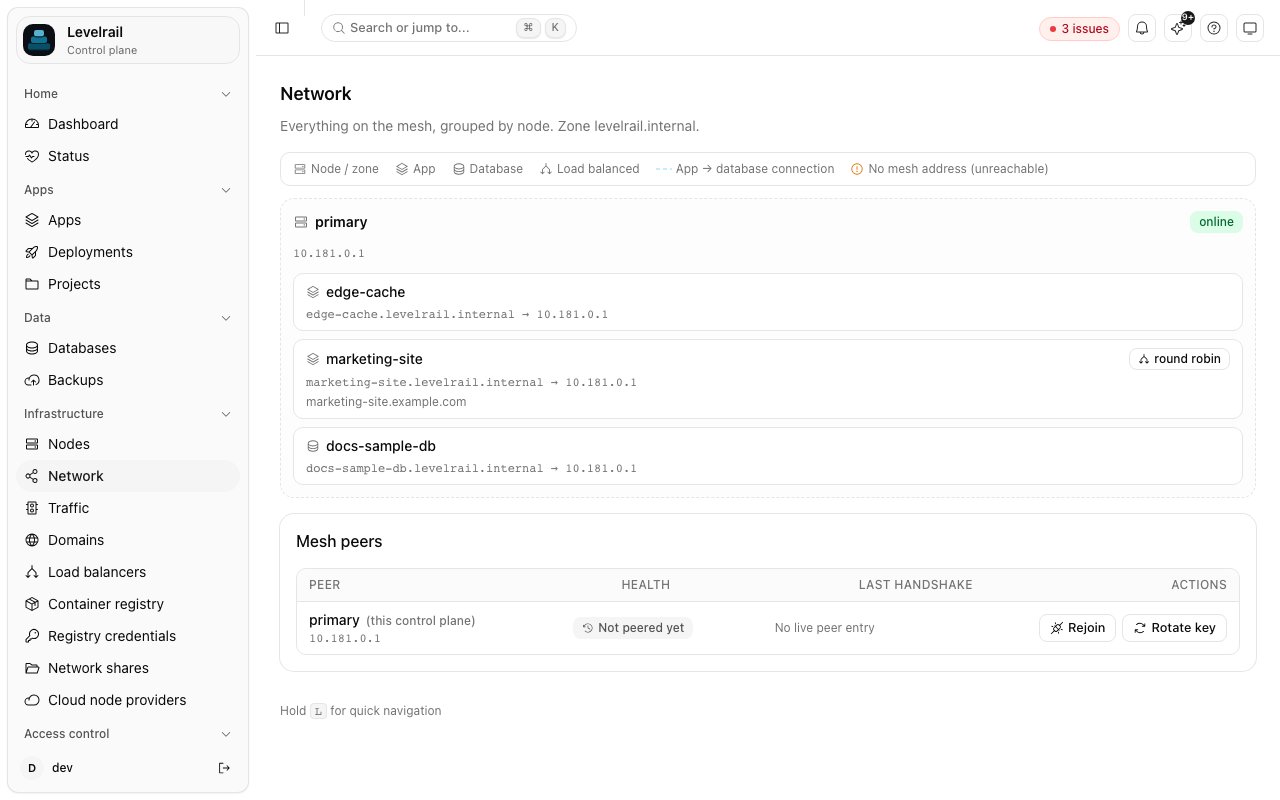
The **Network** page shows every node, app, database, and load-balanced service on the mesh at once, grouped by node, with a note under each app for the database it connects to. It is read-only and built from data the dashboard already has, so it needs no configuration. Find it under **Infrastructure > Network**.
 ```mermaid theme={"dark"}
graph TB
CP["Control plane
```mermaid theme={"dark"}
graph TB
CP["Control plane
GET /api/v1/network/topology"]
subgraph Z1["Zone: node eu-1 (online)"]
A1["App: web"]
A2["App: worker"]
end
subgraph Z2["Zone: node us-1 (online, cordoned)"]
D1["Database: main"]
end
subgraph ZU["Unplaced"]
R1["Resources on a node
the control plane no longer knows about"]
end
CP --> Z1
CP --> Z2
CP --> ZU
A1 -.->|app to database connection| D1
A2 -.->|"no mesh address (unreachable)"| D1
```
## Zones
The first card is always **This server (control plane)**, with its hostname and address. Apps and databases with an empty placement, or placed on the control plane's own node, are listed there, so a single server shows one card and no warnings. Every other enrolled node is its own card, labeled with the node's optional **Region** field (set on the node's detail page; free text) or its name.
Resources placed on a node ID the control plane does not know (for example, a deleted node) land in an **Unplaced** card that names the stale node IDs, instead of being dropped. Move them to this server from the app or database, or re-add the node.
A node card's header also shows the node's status (`online`, `offline`, `pending`) and a separate **Cordoned** badge when the node isn't schedulable, plus its mesh address or "Not on the mesh yet" when it has none.
Each resource row shows its internal DNS name (with a copy button) and, for an app, its port. With the mesh off the row carries a neutral **local** tag. The summary row above the cards shows servers, mesh state, the internal zone, and the resource count.
## Mesh networking card
The **Mesh networking** card shows whether the mesh is off, on, waiting for a restart, or failed to start, with a readiness checklist and an **Enable mesh** button (administrators only). See [Multi-node](/multi-node#enabling-the-mesh-on-the-control-plane) for what each check means and the CLI (`levelrail-cli network mesh status|enable|disable`). The API is `GET` and `PUT /api/v1/mesh/settings`.
The Network page also has a **Restart control plane** button (administrators only), used when the mesh is waiting for a restart. The CLI equivalent is `levelrail-cli system restart --wait`, see [CLI reference](/cli-reference#system-restart).
## Reading the connections
An app row shows **Connects to ``** whenever the app has a connection to it, from either the [connections feature](/connecting-apps-to-databases) or the older single-attachment flow. Both are combined here, so this view reflects every app-to-database link regardless of which mechanism created it.
When the mesh is on, an app or database with no mesh address shows a "No mesh address" warning: it exists in the desired state but the mesh reconciler hasn't given it an address yet, so any cross-node connection to or from it will not resolve until that changes. A remote app also needs a healthy mesh path before the control plane's ingress can serve its domains: see [Routing to apps on remote nodes](/multi-node#routing-to-apps-on-remote-nodes).
## Legend
* **Node / zone**: a managed node, grouped by region.
* **App** / **Database**: a deployed app or [managed database](/managing-databases), placed under the node it runs on.
* **Load balanced**: a service the reconciler is load-balancing across its own replicas (this platform balances a service's own replicas, not multiple distinct backends).
* **Connects to**: a note under an app for each database it connects to.
* **No mesh address**: the mesh is on but the resource has no mesh address yet. Never shown while the mesh is off.
* **local**: the resource is on this server and reachable directly.
## From the CLI and API
`levelrail-cli nodes topology` prints the same summary as a table, and `--json` prints the raw response. The API is `GET /api/v1/network/topology` (`read` ability), documented in the [API reference](/api-reference).
## See also
* [Connecting apps to databases](/connecting-apps-to-databases) - the connections this view shows, and what the reachability badges mean
* [Multi-node](/multi-node) - enrolling nodes and setting up the WireGuard mesh
* [Project topology graph](/service-topology-graph) - the project-scoped, kind-grouped counterpart to this page, with depends\_on, volume, and egress edges too
* [API reference](/api-reference) - `GET /api/v1/network/topology`'s full response shape
This documentation is built and hosted on [Mintlify](https://mintlify.com), a developer documentation platform.