> ## Documentation Index
> Fetch the complete documentation index at: https://docs.levelrail.com/llms.txt
> Use this file to discover all available pages before exploring further.
# Domains and ingress
> Automatic TLS, domain routing, WAF, rate limiting, and redirects, all embedded in the control plane, with no separate proxy to manage.
Levelrail has nothing to install for ingress. The control plane embeds [Caddy](https://caddyserver.com/) as a Go library (`internal/ingress`) and drives it through its admin API, not a hand-written Caddyfile. Config comes from the app specs the reconciler already knows about, so there is no `caddy` binary, no separate proxy container, and no way for ingress config to drift from desired state. The reasoning is in [ADR 005](https://github.com/glincker/levelrail/blob/main/adr/005-caddy-embedded-ingress.md) and the [comparison](/comparison).
## What this covers
| You want to | Go to |
| - | - |
| Put an app on a domain | [Walkthrough: your first domain](#walkthrough-your-first-domain) |
| Get HTTPS with no DNS at all | [Zero DNS setup](#zero-dns-setup-sslipio-hostnames-and-one-click-https) |
| Have Levelrail create DNS records | [Add a domain and go live](#add-a-domain-and-go-live) |
| Fix a certificate that will not issue | [TLS](#tls-whats-actually-shipped-today) and [Domain doctor](#domain-doctor) |
| Block, throttle, redirect or gate traffic | [WAF](#opt-in-waf-and-rate-limiting), [Auth gate](#auth-gate-forward-auth), [Redirects](#domain-redirects) |
| Tune timeouts, client IPs, failover | [Edge limits](#edge-limits-client-ips-and-failover) |
| Open ports or change listen addresses | [Firewall](#firewall-ports-80-and-443) |
## Walkthrough: your first domain
This assumes the control plane is running and an app is deployed (see [Getting started](/getting-started)).
Create an A record (AAAA for IPv6) for the domain pointing at the server's public IP, then check it from a machine outside your network:
```bash theme={"dark"}
dig +short my-app.example.com
levelrail-cli domains check my-app my-app.example.com
```
`domains check` reports whether the domain currently resolves to this control plane's advertised address.
Open the app's **Domains** tab and add the domain inline. No redeploy is needed.
```bash theme={"dark"}
levelrail-cli apps domains add my-app my-app.example.com
levelrail-cli apps domains remove my-app my-app.example.com
levelrail-cli domains list
```
```yaml theme={"dark"}
version: 1
services:
web:
build:
type: dockerfile
domains:
- my-app.example.com
port: 3000
```
Redeploy after editing. Each domain can be claimed by only one service across your whole spec (see [App spec reference](/app-spec-reference)).
Open them in your cloud firewall, `ufw` or `iptables`, or re-run the installer with `LEVELRAIL_CONFIGURE_UFW=1 ./install.sh`. See [Firewall](#firewall-ports-80-and-443).
By default the domain is served over HTTPS with a self-signed certificate, so browsers warn. For a trusted one, enable real ACME (see [TLS](#tls-whats-actually-shipped-today)) and follow the [ACME verification runbook](/acme-verification-runbook).
```bash theme={"dark"}
curl -v https://my-app.example.com
levelrail-cli domains doctor my-app my-app.example.com
```
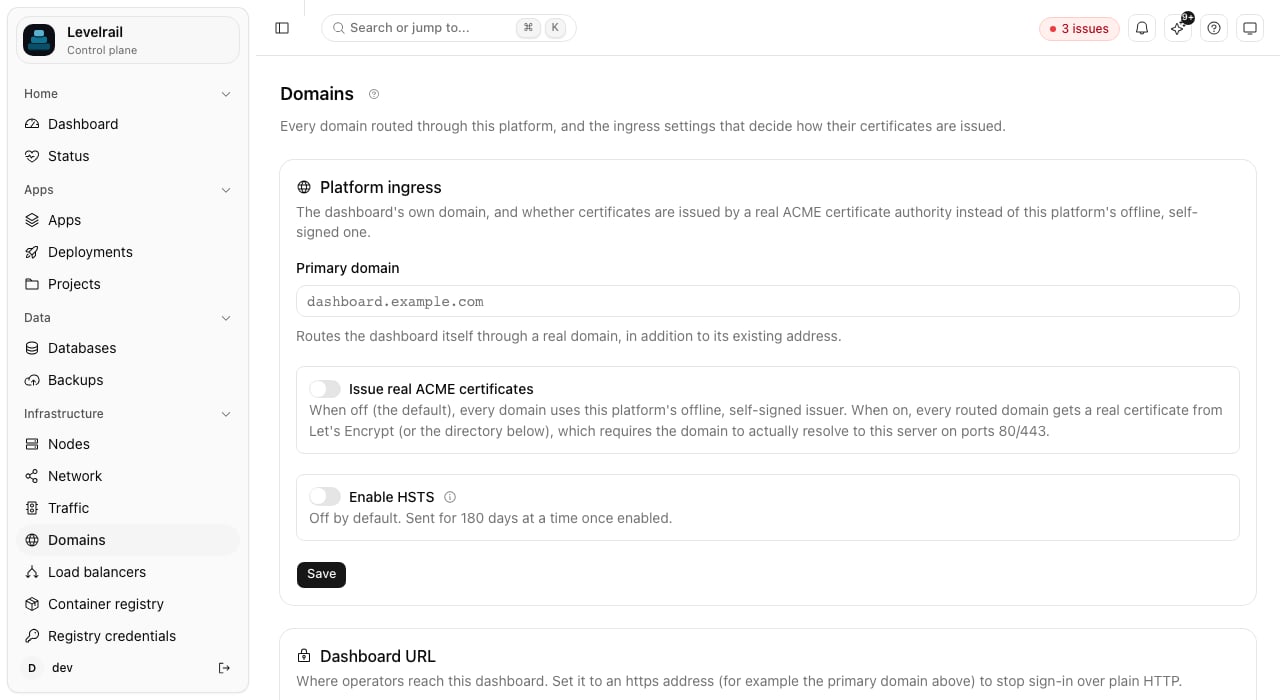
**Infrastructure > Domains** lists every domain across every app with its certificate status, plus read-only badges for WAF, redirect, maintenance mode and basic auth. Edit those settings on the owning app's Domains tab.
 ## How domain routing actually works
When you deploy, the control plane builds a Caddy route that matches incoming requests by `Host` header and reverse-proxies them to the service's container. Static sites (`build.type: static`) skip the container and are served by Caddy from disk. Every request to a configured domain goes through this chain:
```mermaid theme={"dark"}
flowchart TD
A["Request arrives
## How domain routing actually works
When you deploy, the control plane builds a Caddy route that matches incoming requests by `Host` header and reverse-proxies them to the service's container. Static sites (`build.type: static`) skip the container and are served by Caddy from disk. Every request to a configured domain goes through this chain:
```mermaid theme={"dark"}
flowchart TD
A["Request arrives
with Host header"] --> B{"Maintenance
mode on?"}
B -->|Yes| C["Serve maintenance
page"]
B -->|No| D{"Redirect
configured?"}
D -->|Yes| E["Issue redirect
301/302"]
D -->|No| F{"WAF
enabled?"}
F -->|Yes, match| G{"Mode =
detect?"}
G -->|Yes| H["Log match,
allow request"]
G -->|No| I["Block request
with 403"]
F -->|No or skip| H
I --> J["Request ends"]
H --> K{"Rate limit
exceeded?"}
K -->|Yes| L["Return 429"]
K -->|No| M["Proxy to
backend
container"]
C --> J
E --> J
L --> J
M --> J
```
### Setting up DNS
Create an **A record** (or AAAA for IPv6) pointing at your server's public IP address. DNS resolution happens before any request reaches your server, so this is no different from any other platform. Once it resolves and the app is deployed, Caddy starts routing and issuing certificates (depending on your [TLS configuration](#tls-whats-actually-shipped-today)). No manual reload is needed.
DNS changes usually appear within minutes but can take a few hours depending on the record's TTL.
### Managing DNS records from the dashboard
If you have connected Cloudflare DNS or Route53 DNS (see [Wildcard domains](#wildcard-domains-dns-01-providers)), a domain's Domains tab also gets a **DNS records** panel: the A/AAAA/CNAME/TXT/MX/SRV/CAA records in that domain's zone, listed, added, edited and deleted without leaving the dashboard, each with a live resolved/pending/mismatch check against its configured value. It reuses the same provider credentials as wildcard ACME, so no separate API token is needed. NS and SOA records are read-only (provider-managed) and never appear.
The zone shown is a best-effort guess, the domain's last two labels (`app.example.com` becomes `example.com`). That is wrong for multi-label public suffixes like `.co.uk`; the panel always echoes the exact zone it queried.
The CLI covers add, list and remove. Editing a record in place is dashboard-only (it is a delete-then-add under the hood).
```bash theme={"dark"}
levelrail-cli domains dns list
levelrail-cli domains dns add --type A --name www --value 203.0.113.10
levelrail-cli domains dns remove --type A --name www --value 203.0.113.10
```
### Guided setup: domain, DNS, port, certificate
The **Guided setup** button on an app's Domains tab walks one domain through four checks before anything is saved:
1. **Domain.** Pick the environment it belongs to, and optionally route the `www` or apex twin with a redirect to the one you typed.
2. **DNS record.** The exact A, AAAA or CNAME record to add, re-checked live.
3. **Container port.** Whether the running container really listens on the app's port. This reads the container's socket table, so it needs exec access enabled for the app; without it the step says it could not verify.
4. **Certificate.** Which challenge applies. HTTP-01 needs the internet to reach port 80 on this server. If this server sits on a private (LAN, NAT, NAS) address, or the domain is a wildcard, only DNS-01 can work, and the step says which provider is connected (Cloudflare, Route53 or none) and where to connect one.
When a certificate request fails, the dashboard shows the certificate authority's own error next to the one step that usually fixes it: open ports 80 and 443, fix the DNS record, wait out a rate limit, or correct a CAA record. The same reason appears on the Domains list and in `domains check`.
```bash theme={"dark"}
levelrail-cli domains check # DNS, challenge, DNS-01 provider, last CA error
levelrail-cli domains connectivity # do ports 80 and 443 answer here, is the address private
```
`domains connectivity` dials this server's advertised address from the control plane. It cannot prove a port is open to the whole internet, but a private address is decisive: HTTP-01 cannot work there.
### One app, one domain set per environment
An app can carry a separate set of domains for each environment, so you do not duplicate the app for dev, UAT and production. The app routes the set of the environment it is tagged with. An environment without its own set falls back to the app's default domains, so existing apps keep working unchanged.
```bash theme={"dark"}
levelrail-cli apps domains add --env dev dev.example.com
levelrail-cli apps domains add --env uat uat.example.com
levelrail-cli apps domains list --env all
```
`--env` takes an environment id, name or kind. In the dashboard, the Domains tab shows one tab per environment, with the active one marked. Moving the app to another environment switches the routed set on the next reconcile. A hostname still belongs to exactly one app across all sets.
Cloning an environment can copy every app's domain sets under rewritten hostnames, since a hostname cannot be shared:
```bash theme={"dark"}
levelrail-cli apps environments clone --new-name uat \
--copy-domains --domain-find example.com --domain-replace uat.example.com
```
Use `--domain-prefix uat.` instead to prepend a label to every copied hostname.
### The dashboard's own domain
**Infrastructure > Domains** sets the control plane's own `primary_domain`, the one the dashboard itself is reachable at, separate from any app's `domains:`. Give it a dedicated subdomain such as `console.example.com` or `panel.example.com` rather than reusing one an app already serves.
Setting the primary domain to a domain an app already owns is rejected with a `409` naming the conflicting app.
## Zero DNS setup: sslip.io hostnames and one-click HTTPS
[sslip.io](https://sslip.io) is a public DNS service that resolves any dash-encoded IP straight to that IP, so `134-209-118-96.sslip.io` is `134.209.118.96` with no record to create and nothing to wait for. A fresh install uses it to get working HTTPS URLs with no DNS setup at all.
### One-click HTTPS for the dashboard
The Domains page opens with an **Enable HTTPS** card (the setup wizard's domain step shows the same card first). Enter a contact email and click the button. The control plane:
1. sets the dashboard's primary domain to `.sslip.io`,
2. turns on real ACME issuance and asks Let's Encrypt for a certificate over the HTTP-01 challenge,
3. shows `pending`, then `issued` with the issuer and expiry, and
4. once you are looking at the dashboard on that https address, saves it as the dashboard URL (sign-in over plain HTTP is then refused).
```bash theme={"dark"}
levelrail-cli settings ingress https enable --email you@yourdomain.com --wait 2m
levelrail-cli settings ingress https status
```
Add `--staging` to use the Let's Encrypt staging CA while debugging.
```text theme={"dark"}
GET /api/v1/settings/ingress/https
POST /api/v1/settings/ingress/https
```
The contact email is checked before anything is saved: it must be a plain address on a real domain, and `example.com`, `.test`, `.invalid`, `.localhost` and similar reserved names are rejected because Let's Encrypt refuses them. The same applies to the primary domain when real ACME is on.
Ports 80 and 443 must be reachable from the internet. If issuance fails for any reason, the site keeps answering over HTTPS with a certificate signed by the platform's own CA instead of dropping the handshake, and the card shows the certificate authority's error with a hint:
| Hint | Meaning |
| - | - |
| `unreachable` | Let's Encrypt could not connect to port 80. Open 80 and 443 in the host firewall (`ufw allow 80,443/tcp`) and in your cloud provider's security group. |
| `rate_limited` | Let's Encrypt is throttling the hostname. Wait, and use staging while debugging. |
| `dns` | The hostname did not resolve to this server. Check the detected public address. |
| `caa` | A CAA record forbids Let's Encrypt from issuing for the hostname. |
The public CA is retried each time the fallback certificate renews, every `APP_INGRESS_FALLBACK_CERT_LIFETIME` (default `6h`), and immediately when you run the enable command again with a corrected email.
Tick "Test with Let's Encrypt staging first" (or pass `--staging`) to use the staging CA: certificates are not browser trusted, but there are no meaningful limits. Production enable attempts are capped at 5 per hour per control plane (`APP_ACME_MAX_ATTEMPTS_PER_HOUR`) so a misconfiguration cannot burn Let's Encrypt's failed-validation limit; staging is never capped.
| Variable | Effect |
| - | - |
| `APP_ACME_STAGING=true` | Makes staging the default CA. |
| `APP_ACME_DIRECTORY_URL` | Points at any other RFC 8555 CA. |
| `APP_ACME_MAX_ATTEMPTS_PER_HOUR` | Production enable cap (default 5). |
| `APP_ACME_PENDING_TIMEOUT` | A request that never settles is reported as failed after this long (default 2 minutes). |
Switching CA (staging to production, or from the internal issuer to ACME) drops the certificates stored for the previous issuer so they are re-issued. Without this, Caddy keeps serving the old still-valid certificate and never asks the new CA.
### The server's public address
At first start the control plane works out its own public IP, in this order:
1. `APP_PUBLIC_HOST`, if set (an IP, or a hostname if you only need it for DNS checks). This always wins.
2. Otherwise it asks public what-is-my-IP services (`api.ipify.org`, `icanhazip.com`, `ifconfig.me`) and takes the first public answer. Private, loopback and link-local answers are ignored.
The Domains page shows the address and how it was found (`from APP_PUBLIC_HOST`, `detected`, `detection disabled`, `not found`), and `levelrail-cli settings ingress get` prints it as `public_host`.
| Variable | Default | Effect |
| - | - | - |
| `APP_PUBLIC_HOST` | unset | Override the public address. |
| `APP_PUBLIC_IP_DETECT` | on | Set to `off` to never call the outside services (air-gapped or privacy sensitive installs). |
| `APP_PUBLIC_IP_PROBE_URLS` | the three above | Comma separated list of URLs that return the caller's IP as plain text. |
| `APP_PUBLIC_IP_PROBE_TIMEOUT` | `4s` | Overall budget for detection at startup. |
If the server is behind NAT or a [load balancer](/load-balancing), detection finds the wrong address. Set `APP_PUBLIC_HOST` to the address that actually reaches ports 80 and 443 on this box.
### Automatic hostnames for apps
Every app deployed without `domains:` gets:
```text theme={"dark"}
https://..sslip.io
```
It is routed by the same ingress and gets the same TLS treatment as any other domain: a Let's Encrypt certificate once ACME is enabled (the Enable HTTPS card turns it on for every host), Caddy's internal issuer before that.
* It appears on the app's **Network** tab, in `levelrail-cli apps network `, in `levelrail-cli domains list` (source `automatic`) and in `GET /api/v1/domains` (`"automatic": true`).
* It disappears the moment you add a real domain. A configured domain always wins.
* It is generated each pass and never stored on the app, so per-domain features (basic auth, WAF, BYO certificate, maintenance mode) do not apply to it. Add a real domain for those.
* Toggle it per server (not per app) with the **Automatic app hostnames** setting on the Domains page, or `levelrail-cli settings ingress set --fallback-domains=false`.
* It needs a public IPv4 address (detected or `APP_PUBLIC_HOST`). With a private address, a hostname, or detection turned off there is nothing to build, and the Network tab says so.
### HTTP redirects to HTTPS
When the control plane can bind the HTTP ingress port (port 80 as root, the installer's default), every routed host answers plain HTTP with a `308` redirect to the same URL over HTTPS, and Let's Encrypt's HTTP-01 challenge is served on the same listener. A non-root development run that cannot bind port 80 skips the redirect and logs why. `APP_INGRESS_HTTP_REDIRECT=true|false` forces the choice instead of auto detecting.
## Add a domain and go live
With a DNS provider connected, adding a domain does the rest: Levelrail creates the DNS record, waits for it to propagate, checks the certificate and confirms the site answers, then gives you one link.
Connect Cloudflare or Route53 (see [Wildcard domains: DNS-01 providers](#wildcard-domains-dns-01-providers)). The same credential is used for records.
From the dashboard (**Domains**, **Add domains**), with the CLI, or with `PATCH /api/v1/apps/{name}/domains`:
```bash theme={"dark"}
levelrail-cli apps domains add my-app app.example.com --wait
levelrail-cli apps domains add my-app app.example.com --dns preview # show the record, change nothing
levelrail-cli domains go-live my-app app.example.com --wait --timeout 5m
```
`--wait` prints each step as it happens and exits non-zero when the domain is not live within `--timeout`.
### What gets created
* An `A` record to this server's public IPv4 address (an `AAAA` record on an IPv6-only host), or a `CNAME` to the target set with `settings ingress set --dns-cname-target`. A CNAME at a zone apex is only created at Cloudflare, which flattens it.
* An identical record already in place is left as it is. A **different** `A`, `AAAA` or `CNAME` at the same name is reported as a conflict and not overwritten, unless you pass `--replace` (`replace: true`). Other record types such as `TXT` and `MX` are never touched.
* The TTL is the provider's automatic one unless you set `--dns-ttl`. Cloudflare's proxy is off unless you set `--dns-proxied`; when on, set the zone's SSL/TLS mode to Full (strict).
* Removing a domain keeps its record unless you pass `--remove-dns`. Only records Levelrail created are ever removed, and only when their value still matches.
### Token scopes
| Provider | Needed |
| - | - |
| Cloudflare | An API token with `Zone:DNS:Edit` and `Zone:Zone:Read` on the zones you use. Read is how the zone for a domain is found. |
| Route53 | `route53:ListHostedZonesByName`, `route53:ListResourceRecordSets` and `route53:ChangeResourceRecordSets`. |
Creating or changing a record needs the root ability. Every record write is recorded in the audit log as `dns_record.created`, `dns_record.updated` or `dns_record.deleted`.
### Apps base domain
Set a base domain such as `apps.example.com` and every new app created without a domain gets `.apps.example.com`, with its record created, instead of the sslip.io address.
```bash theme={"dark"}
levelrail-cli settings ingress set --apps-base-domain apps.example.com
levelrail-cli domains backfill-base-domain # dry run for existing apps
levelrail-cli domains backfill-base-domain --confirm
```
The base domain must sit inside a zone your provider manages; the dashboard shows whether the zone was found as you type. Existing apps keep their address until you run the backfill.
### The automation policy
`GET/PUT /api/v1/settings/domain-automation` (or **Domains**, **Platform settings**, **Domain automation**, or `levelrail-cli settings domain-automation get|set`) controls what runs on a new domain:
| Key | Default | Effect |
| - | - | - |
| `auto_dns` | on when a provider is connected | Create the DNS record. |
| `auto_proxy_route` | on when the proxy integration is enabled | Wait for the managed proxy route. |
| `force_https` | on | Force HTTPS once a certificate is ready, where this server supports it. |
| `www_policy` | `off` | `redirect_to_apex` or `redirect_to_www` also attaches the partner host, its record and a 301 redirect. |
| `attach_www_counterpart` | off | Attach `www.example.com` with `example.com` and the reverse, without a redirect. |
| `wildcard_for_base_domain` | off | One `*.` record covers every app under the base domain. |
| `verify_after` | on | Probe propagation, certificate and HTTP and report each step. |
A request can override any key with an `automation` object. `POST /api/v1/apps/{name}/domains/go-live/plan` is the dry run: it returns the planned steps and changes nothing. Each run is kept in the automation history with a one-step **Undo** that removes only what that run created (`levelrail-cli domains go-live runs`, `domains go-live undo `). Steps the server cannot do are reported as `skipped` and the rest still completes.
## TLS: what's actually shipped today
### Default: self-signed certificates
Out of the box, every routed domain gets a certificate from Caddy's internal, self-signed issuer. It works immediately with no DNS propagation, no outbound connectivity to a certificate authority and no configuration.
The tradeoff: browsers and HTTP clients show a trust warning until you accept the certificate or switch to a real issuer. Use self-signed for internal tools, staging environments, or first local trials, not for public-facing apps.
### Real public ACME (Let's Encrypt or RFC 8555 CA)
Real ACME issuance is built in. Enable it with the **Issue real ACME certificates** toggle on the Domains page, or:
```bash theme={"dark"}
levelrail-cli settings ingress set --acme-enabled --acme-email you@yourdomain.com
```
The API is `GET/PUT /api/v1/settings/ingress`. An account email is required, and a directory URL is optional.
Real Let's Encrypt issuance, HTTP to HTTPS redirect and trusted-chain handshakes were run on a public VPS (`.sslip.io`, ports 80 and 443 open). The recorded run, including what failed before it worked, is in the [ACME verification runbook](/acme-verification-runbook#recorded-run-2026-10-05).
### HSTS (HTTP Strict Transport Security)
Turn on **Enable HSTS** on the Domains page (or `levelrail-cli settings ingress set --hsts-enabled`) to send `Strict-Transport-Security` on every https response, including the dashboard's HTML page, no restart required. It is never sent over plain HTTP. HSTS defaults to off on purpose.
`APP_ENABLE_HSTS=true` still works. The two are additive: HSTS is sent if either the dashboard toggle or the environment variable is on, so upgrading never turns HSTS off for a deployment that already had it on.
HSTS tells browsers to refuse plain HTTP and refuse certificate warnings on this host for 180 days. Enabling it before ACME is working (while still on self-signed certificates) can lock you out of your own dashboard. Only enable it once real, browser-trusted certificates are issuing.
### Bring your own certificate
For domains ACME can't reach (internal-only hosts, externally issued wildcards, or certificates provisioned before DNS cuts over), upload a certificate and key. Caddy loads it directly and skips automatic issuance for that host.
```bash theme={"dark"}
levelrail-cli domains tls-cert set --cert-file fullchain.pem --key-file privkey.pem
levelrail-cli domains tls-cert get
```
The API is `PUT /api/v1/apps/{name}/domains/{domain}/tls-cert`, and the dashboard has a per-domain TLS control.
## Wildcard domains: DNS-01 providers
Wildcard domains like `*.example.com` need ACME's DNS-01 challenge (HTTP-01 cannot validate wildcards). DNS-01 works by creating a short-lived TXT record at your DNS provider, so you must grant API access.
Two providers are supported, configured platform-wide on the **Domains** page or with the CLI. Only one is active per reconcile pass, and Cloudflare wins if both are enabled.
Use an API token scoped to `Zone:DNS:Edit` and `Zone:Zone:Read` for your zone, never the global API key.
```bash theme={"dark"}
levelrail-cli domains cloudflare-dns set --cf-api-token
levelrail-cli domains cloudflare-dns get
levelrail-cli domains cloudflare-dns clear
```
The API is `GET/PUT/DELETE /api/v1/settings/cloudflare-dns`.
Use an AWS IAM access key pair with `route53:ChangeResourceRecordSets`, `route53:ListResourceRecordSets` and `route53:GetChange`. The region and hosted zone ID are optional.
```bash theme={"dark"}
levelrail-cli domains route53-dns set --aws-access-key-id --aws-secret-access-key
levelrail-cli domains route53-dns get
levelrail-cli domains route53-dns clear
```
The API is `GET/PUT/DELETE /api/v1/settings/route53-dns`.
Credentials are envelope-encrypted at rest and never returned by GET: responses report only whether a credential is present.
## Domains without an app
A domain does not have to belong to an app. A [standalone domain](/standalone-domains) proxies to a port on this server, an address on your network, an external URL, another app's port or a container, and gets every per-domain feature on this page. In the dashboard, **Add domain** offers **Proxy to a port or URL** next to **Route to an app**; from the CLI:
```bash theme={"dark"}
levelrail-cli domains standalone add --target 127.0.0.1:3000 --confirm
```
The same page explains the **Server address** card, which shows the public IPv4 and IPv6 your DNS records must point at, with a manual override.
## Firewall: ports 80 and 443
Public traffic and ACME's HTTP-01 challenge need your server reachable from the internet on **ports 80 and 443**. Port 80 is also how Let's Encrypt validates domain ownership. If it is blocked, issuance fails even if everything else is configured correctly.
Common blockers, all of which look fine from the server itself: a cloud provider firewall or security group, a home router with no port forwarding, and `ufw` in default-deny state.
### Automatic firewall setup
`install.sh` has an opt-in flag:
```bash theme={"dark"}
LEVELRAIL_CONFIGURE_UFW=1 ./install.sh
```
It allows SSH, opens `80/tcp`, `443/tcp` and `443/udp` (HTTP/3), and enables `ufw` if it is not already active. If `ufw` was already active, it only adds the rules. Without the flag, open these ports yourself via your cloud firewall, `ufw` or `iptables`.
### Running on non-default ports
If port 443 (or 80) is already taken on the host, most often by a second control-plane instance, set the ingress listen addresses instead of fighting over the defaults:
```bash theme={"dark"}
APP_INGRESS_HTTPS_ADDR=:8443 \
APP_INGRESS_HTTP_ADDR=:8080 \
./levelrail
```
* `APP_INGRESS_HTTPS_ADDR` (default `:443`): the embedded Caddy ingress's HTTPS listener.
* `APP_INGRESS_HTTP_ADDR` (default `:80`): kept off port 80 only when real ACME (not the default self-signed issuer) is enabled for a non-wildcard domain, since that is the one path that can otherwise reach for a literal port 80 for its HTTP-01 challenge.
`GET /api/v1/system/doctor`'s port checks follow whatever you set here, so a second instance on `:8443`/`:8080` reports those ports as owned and available, not `:443`/`:80`.
## Opt-in WAF and rate limiting
Both are Caddy modules registered at build time, not separate containers. They are off by default and configured per domain.
* WAF: OWASP Coraza with the stock OWASP Core Rule Set (`github.com/corazawaf/coraza-caddy/v2`)
* Rate limiting: Caddy's `rate_limit` module (`github.com/mholt/caddy-ratelimit`)
### WAF modes: detect or block
| Mode | Behavior | Default | Use case |
| - | - | - | - |
| `detect` | Logs OWASP CRS matches but never rejects | Yes, new domains | Monitor for false positives first |
| `block` | Actually rejects requests matching CRS rules | No | Deploy after validating detect logs |
The OWASP CRS can produce false positives against normal app traffic. Enable WAF in `detect` mode first, watch logs for a while, then switch to `block` once you are confident it is not flagging legitimate traffic. There is no auto-promote from detect to block; you flip it yourself.
### Rate limiting parameters
Rate limiting is independent of WAF and configured per client IP with two numbers:
| Parameter | What it does | Example |
| - | - | - |
| `requests/sec` | Sustained cap, averaged over 10 seconds | 20 |
| `burst` | 1-second window allowance above sustained rate | 50 |
Clients exceeding either limit get a 429 response. Set burst equal to or below requests/sec for a strict, non-bursting cap.
### Configuration
Each domain's row in an app's **Domains** tab has an **Add WAF / rate limit** control.
```bash theme={"dark"}
levelrail-cli domains waf get|set|clear
levelrail-cli domains waf set my-app my-app.example.com --waf --mode detect --rps 20 --burst 50
```
```text theme={"dark"}
GET/PUT/DELETE /api/v1/apps/{name}/domains/{domain}/waf
```
* No UI for custom CRS exclusion or override rules.
* No per-path or per-route rate-limit scoping (whole-domain only).
* No separate WAF/rate-limit event log (use Caddy's access log).
## Domain redirects
For force HTTPS, www and apex presets, aliases and other per-domain controls (headers, path forwarders, country rules, caching), see [Domain traffic controls](/domain-traffic-controls).
A redirect sends a domain to a different URL instead of proxying to a container, for example `www.example.com` to `example.com`, or `old-domain.com` to `https://newapp.example.com/promo` during a migration. It uses Caddy's `static_response` handler with a `Location` header, so there is no new container or infrastructure.
### Configuration
Each domain's row in an app's **Domains** tab has an **Add redirect** control.
```bash theme={"dark"}
levelrail-cli domains redirect get|set|clear
levelrail-cli domains redirect set my-app www.example.com --target https://example.com
```
Add `--temporary` for a `302`, or `--status 307`/`--status 308`. The default is a permanent `301`. `--preset www-to-apex` or `--preset apex-to-www` sets up the www and apex pair instead of a fixed target. A redirect that would loop back to its own domain is refused.
```text theme={"dark"}
GET/PUT/DELETE /api/v1/apps/{name}/domains/{domain}/redirect
```
### Redirect status codes
| Code | Type | Use case |
| - | - | - |
| `301` | Permanent (default) | Renames, www-to-apex normalization, or expected permanent moves |
| `302` | Temporary | Redirects you plan to undo (browsers and search engines don't cache these) |
| `307` | Temporary, keeps the method | Like 302, but a POST stays a POST |
| `308` | Permanent, keeps the method | Like 301, but a POST stays a POST |
### Requirements
* The domain must already be one of the app's domains. Add it first with `levelrail-cli apps domains add www.example.com`.
* Target must be an absolute URL, such as `https://example.com`. Bare hostnames, relative paths, and non-HTTP(S) schemes are rejected.
* A target that is only an origin keeps the request path and query, so `www.example.com/pricing?plan=pro` goes to `https://example.com/pricing?plan=pro`. A target with its own path, query, or fragment always redirects to exactly that URL.
If a domain has both a redirect and maintenance mode configured, maintenance mode wins and the domain serves the maintenance response. Clear maintenance mode to let a configured redirect take effect.
## Custom error pages
Replace Caddy's bare default error text, or whatever the backend returned, with your own HTML for a domain. Four status codes are supported: `404`, `500`, `502` and `503`. The original status code is kept and only the body changes. It covers both a status the backend actually returns and a proxy failure such as an unreachable container, which Caddy turns into its own 502 or 504.
* A domain can have several mappings at once, for example a custom `404` and a separate `503` "temporarily down" page.
* The HTML is served byte for byte: no templating, no variables, and no per-app default separate from the per-domain mapping.
Each domain's row in an app's **Domains** tab has an **Add error page** control. Pick a status code and paste in HTML. There is no live preview.
```bash theme={"dark"}
levelrail-cli domains error-pages get|set|clear
levelrail-cli domains error-pages set my-app my-app.example.com --code 404 --body-file 404.html
```
```text theme={"dark"}
GET/PUT/DELETE /api/v1/apps/{name}/domains/{domain}/error-pages
```
`PUT` upserts one status code mapping per call. `DELETE` takes an optional `?status_code=` to remove one mapping, or removes all of the domain's mappings when omitted.
## Hide a domain from search engines
Consoles, staging sites and internal tools should not show up in search results. Per domain, turn on **Hide from search engines** (domain editor), run `levelrail-cli domains search-visibility --hide`, or `PUT /api/v1/apps/{name}/domains/{domain}/search-visibility` with `{"hidden": true}`. The ingress then:
* sends `X-Robots-Tag: noindex, nofollow, noarchive, nosnippet` on every response, overriding the app's own value;
* answers `/robots.txt` itself with a disallow-all file, even if the app serves its own.
This is a request that well-behaved crawlers honour. It is not access control: use basic auth or an [auth gate](#auth-gate-forward-auth) to keep people out. It takes effect on the next ingress reconcile pass, and a crawler that already indexed the page drops it on its next visit. Domains are open to search engines by default.
## Auth gate (forward auth)
An auth gate puts your own auth service (Authelia, oauth2-proxy, a small app of your own) in front of a domain. Before a request reaches your app, the ingress sends a `GET` to the auth service with the original request's `Cookie` and `Authorization` headers plus `X-Forwarded-Method`, `X-Forwarded-Uri`, `X-Forwarded-Host`, `X-Forwarded-Proto` and `X-Forwarded-For`. The request body is never sent.
* **2xx**: the request goes on to your app, carrying only the response headers you listed in **copy headers**.
* **Anything else**: the auth service's status, headers (including `Location` and `Set-Cookie`) and body go straight back to the visitor. A `302` to your login page just works.
* **Auth service down or too slow**: the visitor gets a `502` (unreachable) or `504` (timed out). The request never reaches your app.
The gate is off by default and runs after rate limiting, the WAF and basic auth, and before caching and the proxy to your app.
On every request to a gated domain, the ingress first deletes any copy of each copy header that the visitor sent. Your app only ever sees values that came from the auth service.
### Worked example
Your auth service answers `GET /check`. For a signed-in visitor it returns `200` with `X-User`, `X-Email` and `X-Name`; otherwise it returns `302` to its login page.
```bash theme={"dark"}
levelrail-cli domains auth-gate set my-app app.example.com \
--url http://auth:9091 --check-path /check \
--copy-header X-User,X-Email,X-Name
```
A visitor who sends `X-User: admin` themselves gets that header removed before the check. If the visitor is signed in, the app receives the auth service's `X-User`, `X-Email` and `X-Name`.
### Settings
| Setting | Default | Notes |
| - | - | - |
| Auth URL | required | `http` or `https`, a host, no username or password, no query. Internal addresses are allowed. A base path is kept: `https://auth.example.com/api` plus `/check` calls `/api/check`. |
| Check path | `/` | Absolute path, may carry its own query. |
| Copy headers | none | Up to 16 header names. `Cookie`, `Authorization`, `Host` and the `X-Forwarded-*` headers cannot be copied. |
| Timeout | `APP_AUTH_GATE_TIMEOUT` (default `5s`) | Per domain override in seconds. The env var takes a Go duration (`3s`) or whole seconds. |
Each domain's row in an app's **Domains** tab has an **Add an auth gate** control next to basic auth.
```bash theme={"dark"}
levelrail-cli domains auth-gate get|set|clear
```
```text theme={"dark"}
GET/PUT/DELETE /api/v1/apps/{name}/domains/{domain}/auth-gate
```
Writes need the root ability, like basic auth.
### Built-in sign-in (SSO for apps)
Instead of running your own auth service, set the provider to **Levelrail sign-in** (`builtin`). Visitors sign in with their account on this installation, through the same sign-in page as the dashboard (passwords, passkeys, two-factor), and only the users, [teams and roles](/teams-and-roles) you allow get through. Your app receives `X-User` and `X-Email` (the email) and `X-Name` (the display name). Visitor-sent copies of those headers are always removed first.
It needs the platform primary domain (**Settings > Ingress**), because visitors are sent to the dashboard to sign in. Signing in there with an OAuth provider (Google, GitHub) ends on the dashboard; open the app link again and it goes straight through.
```bash theme={"dark"}
levelrail-cli domains auth-gate set my-app app.example.com \
--provider builtin --allow alice@example.com --allow-team ops --allow-role support
levelrail-cli domains auth-gate log my-app app.example.com --since 24h
levelrail-cli domains auth-gate revoke my-app app.example.com
```
Nobody gets in by default. A built-in gate with no allow rule denies everyone, including admins.
A few behaviours to know:
* Denied users see a plain 403 page that names the account they are signed in with, never a redirect loop. Fetch and XHR requests (`Accept: application/json` or `X-Requested-With`) get a `401` JSON body with a `login_url` instead of a redirect.
* A guest, meaning a user whose role only sees granted environments, also needs a grant for the app's environment. Standalone domains have no environment, so they are closed to such users.
* Plain http apps cannot use the built-in provider unless `APP_GATE_ALLOW_HTTP=true`; the session cookie is then not `Secure`.
| Variable | Default | Effect |
| - | - | - |
| `APP_GATE_TOKEN_TTL` | `1m` | Sign-in tokens are single use, only work on the host they were issued for and only in the browser that started the sign-in. Only hashes are stored. |
| `APP_GATE_SESSION_TTL` | `12h` | Gate sessions end early when the user signs out of the dashboard (or is signed out everywhere), is removed, loses access, or when you press **Sign out all visitors**. Access is re-checked on every request. |
| `APP_GATE_EVENT_RETENTION` | `30d` | Access log rows older than this are pruned hourly. |
```text theme={"dark"}
browser app.example.com (ingress) dashboard (cp.example.com)
| GET /orders | |
|------------------------->| check: no gate session |
|<-- 302 cp/gate/login?rd=https://app.example.com/orders&state=S
| Set-Cookie: __Host-gate_state=S (app host only) |
| GET /gate/login?rd=...&state=S --------------------------->|
| | not signed in: 302 /login, then back here
| | rd host must have a built-in gate
| | user must match an allow rule
|<-- 302 https://app.example.com/orders?_gate_token=T --------|
| GET /orders?_gate_token=T| |
|------------------------->| check: T unused, unexpired, for this host,
| | state cookie matches, dashboard session live
|<-- 302 /orders Set-Cookie: __Host-gate_session (host only, 12h)
| GET /orders (cookie) | |
|------------------------->| check: session valid, user still allowed
| | -> app with X-User, X-Email, X-Name
```
#### Access log
Every decision is recorded with time, domain, user, decision, reason and client IP: `allowed`, `denied`, `login_redirect`, `token_issued`, `token_exchange` and `session_revoked`. Identical events in the same minute are stored as one row with a count, so busy apps do not grow the database per request. Read it on the domain's auth gate card (**Show access log**), with `levelrail-cli domains auth-gate log`, or at `GET /api/v1/apps/{name}/domains/{domain}/auth-gate/events?since=24h` (needs `read:sensitive`).
## Edge limits, client IPs and failover
Every proxied domain gets the same edge policy, on by default. All of it is tuned by environment variables on the control plane (set them in the systemd unit or compose file); `APP_INGRESS_HARDENING=false` restores the bare Caddy config. `levelrail-cli doctor` shows the active policy in its `ingress_edge` check.
| Variable | Default | What it does |
| - | - | - |
| `APP_INGRESS_READ_HEADER_TIMEOUT` | `10s` | Time a client gets to send its request headers. This is the slowloris limit. |
| `APP_INGRESS_READ_TIMEOUT` / `APP_INGRESS_WRITE_TIMEOUT` | `0` (off) | Whole-request deadlines. Left off so uploads, downloads and SSE streams keep working. |
| `APP_INGRESS_IDLE_TIMEOUT` | `2m` | Idle keep-alive connections are closed after this. |
| `APP_INGRESS_MAX_HEADER_BYTES` | `131072` | Largest request header block. |
| `APP_INGRESS_MAX_BODY_BYTES` | `1073741824` | Largest request body (1 GiB), answered with `413`. `0` removes the cap. |
| `APP_INGRESS_PROTOCOLS` | `h1,h2,h3` | HTTP/1.1, HTTP/2 and HTTP/3. HTTP/3 needs `443/udp` open. |
| `APP_INGRESS_RETRY_WINDOW` | `2s` | How long a request is retried when its upstream refuses connections, before the friendly 503. |
| `APP_INGRESS_DIAL_TIMEOUT` | `2s` | Time allowed to connect to a container. |
| `APP_INGRESS_PASSIVE_FAIL_DURATION` | `5s` | A replica that fails a connection is skipped for this long (pools of two or more replicas only). |
| `APP_INGRESS_UNAVAILABLE_RETRY_AFTER` | `5` | Seconds in the `Retry-After` header of the friendly 503. |
| `APP_INGRESS_GRACE_PERIOD` | `0` (`3s` with socket activation) | How long in-flight requests get to finish when the process stops. |
| `APP_INGRESS_HOLD_WINDOW` | `10m` | How long a previously routed domain keeps its route and certificate while its app has no ready container (see [When a backend is down](#when-a-backend-is-down)). |
There is no per-IP connection limit: Caddy has none built in. Put a firewall rule or the [WAF rate limit](#opt-in-waf-and-rate-limiting) in front if you need one.
### Real client IPs behind a CDN or proxy
By default the app sees the address that connected to Levelrail, and any `X-Forwarded-For` the client sent is discarded (so it cannot be spoofed). If Levelrail itself sits behind Cloudflare, a load balancer or another proxy, tell it which peers to trust:
```bash theme={"dark"}
APP_INGRESS_TRUSTED_PROXIES=203.0.113.0/24,private_ranges
APP_INGRESS_CLIENT_IP_HEADERS=CF-Connecting-IP # optional, defaults to X-Forwarded-For
```
`private_ranges` expands to the RFC 1918 and loopback ranges. For a trusted peer, the client address is read from the header (right to left for `X-Forwarded-For`, so a forged left-most entry is ignored), appended to `X-Forwarded-For`, and sent to the app as `X-Real-IP`. Every app receives `X-Real-IP`, trusted proxy or not.
Keep the trusted list to the proxies you actually run: anything listed can claim any client address.
### Running behind a TLS proxy
If the proxy is Traefik (Coolify's included), `levelrail-cli proxy setup` turns this mode on and writes one route per domain into Traefik's watched directory, kept in step with every domain you add or remove. See [Run behind an existing proxy](/behind-an-existing-proxy#one-step-setup-traefik-including-coolify). The domain check then says the proxy handles certificates instead of asking for ports 80 and 443 on this server.
If Traefik, nginx or Caddy owns 80 and 443 and forwards to this ingress, set the **Public HTTPS port** (`public_https_port`, usually `443`) so generated links omit the ingress listen port, and turn on `tls_terminated_upstream` when the proxy also holds the certificates so this instance never runs ACME. Details and a Traefik example: [Run behind an existing proxy](/behind-an-existing-proxy#several-instances-behind-one-proxy). An ACME failure notice for non-standard ingress ports does not apply in this mode, because the proxy handles HTTPS.
### When a backend is down
A request that cannot reach its container is retried for `APP_INGRESS_RETRY_WINDOW`. With two or more replicas a refused connection moves to another replica at once and the failed one is skipped for `APP_INGRESS_PASSIVE_FAIL_DURATION`, so a killed replica costs no requests. A single-replica app, or a pool with no live replica, answers a styled `503` with `Retry-After` and a page that reloads itself, not Caddy's bare `502`. A [custom error page](#custom-error-pages) for the domain replaces it.
A domain whose app was routed in the last `APP_INGRESS_HOLD_WINDOW` (default `10m`) but has no ready container right now (a `recreate` deploy, a crash, a restart) keeps its route and its certificate and answers the same `503` instead of a TLS error or a dead connection. A domain that has never been routed since the control plane started is not held, so adding a domain before the first deploy does not start certificate issuance early.
### Surviving a control plane restart
The embedded Caddy lives in the control plane process, so a restart would close ports 80 and 443 for its length. New installs close that gap by default: systemd owns the listening sockets.
```bash theme={"dark"}
./install.sh # new install, socket activation on
LEVELRAIL_SOCKET_ACTIVATION=0 ./install.sh # new install, opt out
LEVELRAIL_SOCKET_ACTIVATION=1 ./install.sh upgrade # switch an existing install (one short stop)
LEVELRAIL_SOCKET_ACTIVATION=0 ./install.sh upgrade # switch back
```
An `upgrade` with the variable unset keeps whichever mode the install is already in. Docker Compose deployments are unchanged: they do not use systemd and bind the ports themselves.
The installer writes `levelrail-http.socket` and `levelrail-https.socket`. The control plane detects the inherited sockets (`LISTEN_FDS`, named `http` and `https`) on its own; no extra setting is needed. While the process is down the kernel queues new connections, and the new process serves them when it is up, so visitors see a slower response instead of a refused connection. Measured numbers are on the [resilience](/resilience#ingress-availability-windows-measured) page, and the decision is in [ADR 025](https://github.com/glincker/levelrail/blob/main/adr/025-ingress-restart-gap-socket-activation.md).
* HTTP/3 and ACME HTTP-01 are not available in this mode (TLS-ALPN-01 on 443 and DNS-01 still issue certificates).
* The sockets stay open while the service is stopped on purpose.
## Raw TCP streams: forwarding a non-HTTP port
Domains, WAF, redirects and error pages are all for HTTP(S). Some services are not HTTP: a Postgres instance, an SSH server, a game server. A **stream** forwards a host port to one of an app's container ports byte for byte, with no Host-header routing and no protocol awareness.
```bash theme={"dark"}
levelrail-cli apps streams create my-postgres --host-port 15432 --container-port 5432
levelrail-cli apps streams list my-postgres
levelrail-cli apps streams delete my-postgres
```
The dashboard's app **Streams** tab lists, adds and removes forwards, and the API is `GET`/`POST`/`DELETE /api/v1/apps/{name}/streams`.
Streams use the same embedded Caddy through its [`layer4`](https://github.com/mholt/caddy-l4) app, not a second proxy.
Creating or deleting a stream restarts the app automatically, because Docker cannot add a published port to a running container.
Scope: TCP only, one stream per forward, no access lists, and no TLS termination on the stream (if the backend speaks TLS, that is between the client and the backend). Multi-app and load-balanced streams are not supported.
## Traffic: routing status for every domain at a glance
**Infrastructure > Traffic** in the dashboard (`GET /api/v1/network/proxy`, `read` ability) is a flat, one-row-per-domain table: which app a domain routes to, which node that app actually runs on, whether this control plane's own embedded ingress can reach it, its port, and TLS status and issuer.
It exists to catch one failure that is otherwise invisible. The embedded Caddy ingress reaches an app on another node only over the WireGuard mesh. If that path is down, the app's container can be perfectly healthy while its domain silently never routes. When the path is healthy the domain shows **Reachable**. See [Multi-node: Routing to apps on remote nodes](/multi-node#routing-to-apps-on-remote-nodes) for how the mesh bind works.
A domain in the broken state shows an **Unreachable** badge with the reason (with a banner at the top of the page when any exist; `levelrail-cli nodes traffic` prints the same reason). Each unreachable row carries a **Move** button straight to the move-with-volumes flow described in [Moving an app with its volumes](/multi-node#moving-an-app-with-its-volumes), or run the fix directly:
```bash theme={"dark"}
levelrail-cli apps set-node
# or, to let auto-placement choose again:
levelrail-cli apps clear-node
```
## Reachable links, health summary and the domain doctor
### Domain doctor
When a domain does not work, start here. `POST /api/v1/apps/{name}/domains/{domain}/doctor` (`read` ability) runs ordered checks and returns one fix per problem:
```bash theme={"dark"}
levelrail-cli domains doctor shop shop.example.com # prioritised fix list
levelrail-cli domains doctor shop shop.example.com --json
```
Each check has a `state` (`pass`, `warn`, `fail`, `skipped`, `unavailable`), a `tier` (1 blocks traffic, 2 blocks the certificate, 3 breaks soon, 4 hygiene) and, when it is not passing, a `fix` with a summary and at most one action (`request` with the API call, `link`, or `copy` with the exact record).
| Check | What it looks at |
| - | - |
| `dns.resolves` | what this server and public resolvers answer, and whether they disagree (propagating) |
| `dns.points_here` | whether the answers include this server's public address |
| `dns.aaaa_mismatch` | AAAA records that send IPv6 visitors somewhere else |
| `dns.cname_apex` | a CNAME at the zone apex |
| `caa.blocks_issuer` | CAA records that do not allow `letsencrypt.org` |
| `app.running` | the app is running and ready |
| `domain.held_back` | an import staged the domain without routing it |
| `proxy.ports` | another container (Traefik, nginx, Caddy) publishing port 80 or 443 |
| `net.port80` | port 80 answers (Let's Encrypt validates over it) |
| `tls.certificate` | the certificate served on 443 for this name: issuer, expiry, name mismatch, and a proxy's default certificate such as `TRAEFIK DEFAULT CERT` or Caddy's local authority |
| `http.status` | what `GET /` returns over HTTPS |
| `redirect.chain` | redirect loops, HTTP not redirecting to HTTPS, www and apex hops |
| `hsts.risk` | an untrusted certificate behind HSTS (a header from the site, or a preloaded TLD such as `.dev`), which browsers refuse with `net::ERR_CERT_AUTHORITY_INVALID` and no way to click through |
| `cert.renewal` | the stored certificate, stalled renewal, or the CA's last error with its next action |
Example response:
```json theme={"dark"}
{
"domain": "shop.example.com",
"app": "shop",
"checked_at": "2026-10-10T12:00:00Z",
"status": "problems",
"probed": true,
"checks": [
{"id": "tls.certificate", "title": "A default certificate from Traefik is served", "state": "fail", "tier": 2,
"detail": "subject \"CN=TRAEFIK DEFAULT CERT\" ...",
"fix": {"summary": "Give that proxy a route and certificate for this domain ...",
"action": {"kind": "request", "label": "Show proxy setup", "api": "GET /api/v1/system/reverse-proxy?domain=shop.example.com"}}}
]
}
```
The doctor only connects to the domain when it resolves to this server's own public address (`APP_PUBLIC_HOST` or the detected public IPs, never the request's Host header), and it always dials that address, never an address taken from DNS. When the domain points elsewhere it runs the DNS checks only, sets `probed` to false and explains why in `probe_note`. The whole run is bounded by `APP_DOMAIN_DOCTOR_TIMEOUT` (default `20s`) and each probe by `APP_DOMAIN_DOCTOR_PROBE_TIMEOUT` (default `4s`).
Probes run from this server, so a NAT that does not hairpin can make a port check warn even when visitors connect fine.
### `reachable_url`: the link that actually works
`GET /api/v1/domains` returns `reachable_url` on every row, and `GET /api/v1/apps/{name}/environment-domains` returns a `reachability` map keyed by domain. The URL is `https://`, with the public HTTPS port only when one is configured (or 443 when TLS is terminated by a proxy in front). It is present only when the app is running and the domain is routable. Otherwise the field is omitted and `reachable_reason` says why:
| Reason | Meaning |
| - | - |
| `held_back` | an app import staged the domain without routing it yet |
| `stopped` | the app is stopped or has never run |
| `not_routed` | no standard public link exists: the ingress listens on a non standard port and no public HTTPS port is set, or the domain is not in the app's active environment |
| `not_resolving` | the last DNS check found no record, or a record pointing elsewhere (not counted when your own proxy fronts this server) |
The dashboard builds its **Open site** button from this field only, so it never shows a `:8443` or sslip.io link that does not answer. `levelrail-cli domains list` prints it in the `URL` column.
### Health summary
`GET /api/v1/traffic/summary` (`read` ability) feeds the sidebar badge and the health strip. `levelrail-cli domains summary` prints the same counts. It never does network I/O: it reads stored state and the last DNS check result for each domain, and is cached for `APP_TRAFFIC_SUMMARY_CACHE_TTL` (default `5s`).
* Domains are counted as `live`, `propagating`, `waiting`, `needs_attention`, `not_set_up`, `paused` or `unknown` (a domain never checked since the control plane started is `unknown`).
* Certificates are counted when expiring within `APP_TRAFFIC_CERT_EXPIRY_DAYS` days (default 30), expired, or failing to renew.
* Zone delegation and proxy route errors are listed in `unavailable` until those features report them.
```json theme={"dark"}
{
"generated_at": "2026-10-10T12:00:00Z",
"domains": {"total": 6, "live": 3, "waiting": 1, "propagating": 1, "needs_attention": 1, "not_set_up": 0, "paused": 0, "unknown": 0},
"certificates": {"window_days": 30, "expiring": 1, "expired": 0, "renewal_failing": 1},
"domains_not_resolving": 1,
"attention": 1,
"unavailable": ["zones_not_delegated", "routes_with_errors"]
}
```
### Activity
`GET /api/v1/domains/{domain}/activity` (`read` ability, limited to domains whose app you can see) returns the domain's recent changes from the audit log plus certificate issuance, renewals and the CA's last failure, newest first, as `{events: [{id, at, kind, title, detail, failed, action, actor: {type, name}, object: {type, id, href}}], next_cursor}`. Pass `next_cursor` back as `?before=` for the next page; `?limit=` and `?actions=` work as on the audit log. `levelrail-cli domains activity ` prints it.
## Next steps
Headers, path forwarders, country rules, caching and redirects per domain.
Issue and verify a real Let's Encrypt certificate.
Balance traffic across an app's replicas.
Configure domains in `app.yaml`.
How ingress reaches apps on worker nodes.
Proxy a domain to a port or URL with no app behind it.
This documentation is built and hosted on [Mintlify](https://mintlify.com), a developer documentation platform.

