> ## Documentation Index
> Fetch the complete documentation index at: https://docs.levelrail.com/llms.txt
> Use this file to discover all available pages before exploring further.
# Cost estimate
> How Levelrail's "what this would cost elsewhere" app cost estimate is calculated, its assumptions, and the env vars that let you correct the reference rates for your own region.
An app's **Resources** tab shows what it might cost per month under three reference pricing profiles. Look for **What this would cost elsewhere**, folded at the bottom of the Optimise panel.
```bash theme={"dark"}
levelrail-cli apps cost NAME
```
```bash theme={"dark"}
curl -H "Authorization: Bearer $TOKEN" https://levelrail.example.com/api/v1/apps/NAME/cost-estimate
```
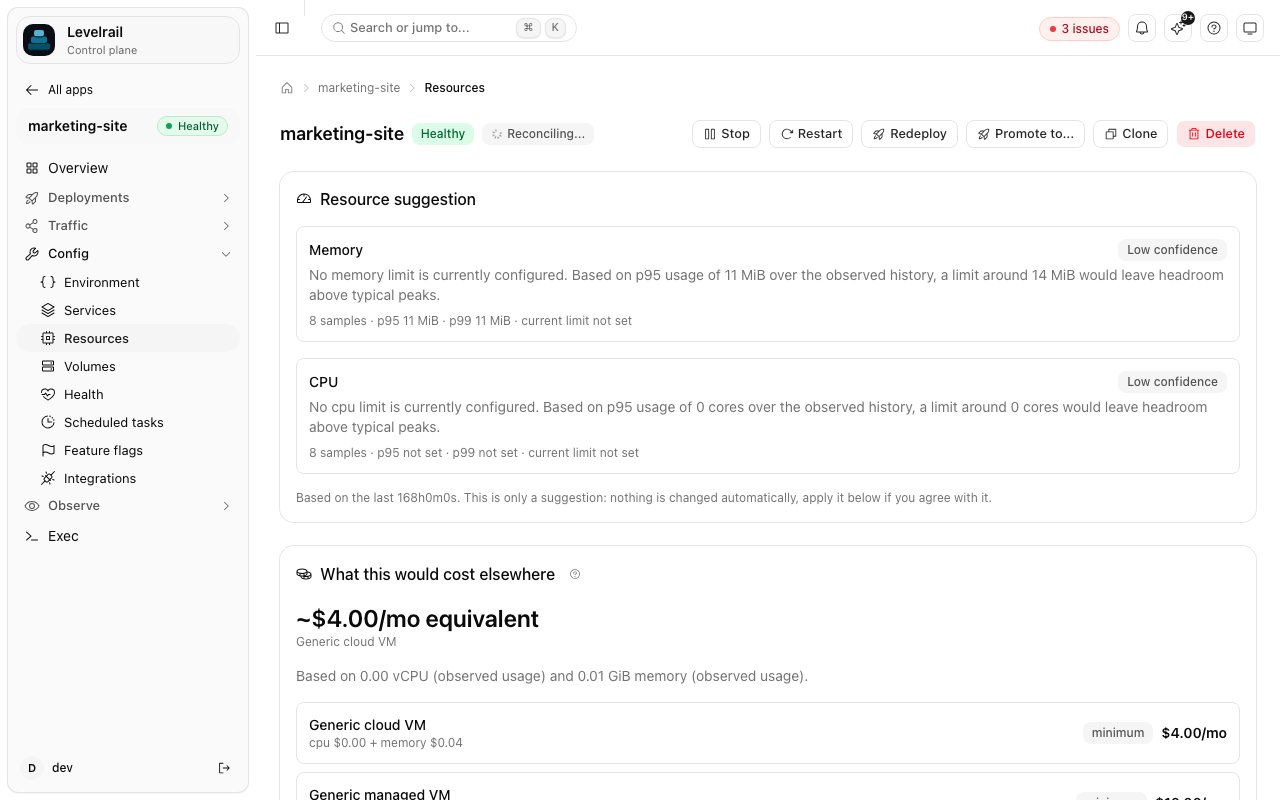 **This is an estimate, not a real bill.** It never calls a live pricing API and does not reflect what your own hardware costs. It shows roughly what the same CPU and memory would cost under typical metered cloud pricing, so you have something to compare against.
## What it is based on
CPU and memory are resolved independently, in this order:
1. **Declared:** the app has a memory or CPU limit in its `resources:` block (or set through the API or CLI).
2. **Observed:** no limit, but enough usage telemetry exists. The estimate uses the p95 of CPU and memory over the last 7 days, the same window the resource recommendation feature uses.
3. **Unavailable:** neither exists yet. You still get a response, priced at each provider's minimum, and the basis fields say there is nothing real behind the number.
## The formula
For each reference provider:
```
cpu_cost = vcpu_cores * cpu_per_core_usd
memory_cost = memory_gib * memory_per_gib_usd
total = max(cpu_cost + memory_cost, minimum_usd)
```
The formula has no tiered discounts, sustained-use pricing, egress or storage costs.
## Reference providers
Three profiles ship by default (defined in `internal/costestimate/costestimate.go`). The numbers are round, not any real provider's rate card.
| Key | Represents | \$/vCPU-core/mo | \$/GiB/mo | Minimum/mo |
| - | - | - | - | - |
| `vm` | A bare unmanaged cloud VM | 4 | 4 | 4 |
| `managed_vm` | A managed VM with backups and support bundled in | 8 | 6 | 10 |
| `paas` | Metered container PaaS pricing, which adds a margin over raw compute | 25 | 10 | 7 |
## Correct the rates for your region
Each rate can be overridden on the control plane with `APP_COST_ESTIMATE__CPU_USD`, `APP_COST_ESTIMATE__MEMORY_USD` and `APP_COST_ESTIMATE__MINIMUM_USD`, where `` is the uppercased key from the table (`VM`, `MANAGED_VM`, `PAAS`).
```bash theme={"dark"}
APP_COST_ESTIMATE_VM_CPU_USD=3.5
APP_COST_ESTIMATE_VM_MEMORY_USD=3.0
APP_COST_ESTIMATE_VM_MINIMUM_USD=5
APP_COST_ESTIMATE_PAAS_CPU_USD=20
```
A malformed or negative value is ignored and the built-in default is kept. Restart the control plane after changing any of them.
This documentation is built and hosted on [Mintlify](https://mintlify.com), a developer documentation platform.
**This is an estimate, not a real bill.** It never calls a live pricing API and does not reflect what your own hardware costs. It shows roughly what the same CPU and memory would cost under typical metered cloud pricing, so you have something to compare against.
## What it is based on
CPU and memory are resolved independently, in this order:
1. **Declared:** the app has a memory or CPU limit in its `resources:` block (or set through the API or CLI).
2. **Observed:** no limit, but enough usage telemetry exists. The estimate uses the p95 of CPU and memory over the last 7 days, the same window the resource recommendation feature uses.
3. **Unavailable:** neither exists yet. You still get a response, priced at each provider's minimum, and the basis fields say there is nothing real behind the number.
## The formula
For each reference provider:
```
cpu_cost = vcpu_cores * cpu_per_core_usd
memory_cost = memory_gib * memory_per_gib_usd
total = max(cpu_cost + memory_cost, minimum_usd)
```
The formula has no tiered discounts, sustained-use pricing, egress or storage costs.
## Reference providers
Three profiles ship by default (defined in `internal/costestimate/costestimate.go`). The numbers are round, not any real provider's rate card.
| Key | Represents | \$/vCPU-core/mo | \$/GiB/mo | Minimum/mo |
| - | - | - | - | - |
| `vm` | A bare unmanaged cloud VM | 4 | 4 | 4 |
| `managed_vm` | A managed VM with backups and support bundled in | 8 | 6 | 10 |
| `paas` | Metered container PaaS pricing, which adds a margin over raw compute | 25 | 10 | 7 |
## Correct the rates for your region
Each rate can be overridden on the control plane with `APP_COST_ESTIMATE__CPU_USD`, `APP_COST_ESTIMATE__MEMORY_USD` and `APP_COST_ESTIMATE__MINIMUM_USD`, where `` is the uppercased key from the table (`VM`, `MANAGED_VM`, `PAAS`).
```bash theme={"dark"}
APP_COST_ESTIMATE_VM_CPU_USD=3.5
APP_COST_ESTIMATE_VM_MEMORY_USD=3.0
APP_COST_ESTIMATE_VM_MINIMUM_USD=5
APP_COST_ESTIMATE_PAAS_CPU_USD=20
```
A malformed or negative value is ignored and the built-in default is kept. Restart the control plane after changing any of them.
This documentation is built and hosted on [Mintlify](https://mintlify.com), a developer documentation platform.