> ## Documentation Index
> Fetch the complete documentation index at: https://docs.levelrail.com/llms.txt
> Use this file to discover all available pages before exploring further.
# Coolify alternative: a self-hosted deploy platform that stays light
> Levelrail is an open source Coolify alternative: Docker Engine API instead of SSH, built-in metrics and logs, one-click rollback, read-only importer.
**A lighter way to self-host what you deploy with Coolify**
Levelrail is an open source deployment platform for your own servers. Its agent talks to Docker's Engine API directly instead of SSHing in and shelling out, so the platform stays out of your apps' way.
[Get started](/getting-started) | [View on GitHub](https://github.com/glincker/levelrail)
```bash theme={"dark"}
curl -fsSL https://levelrail.com/install.sh | sudo sh
```
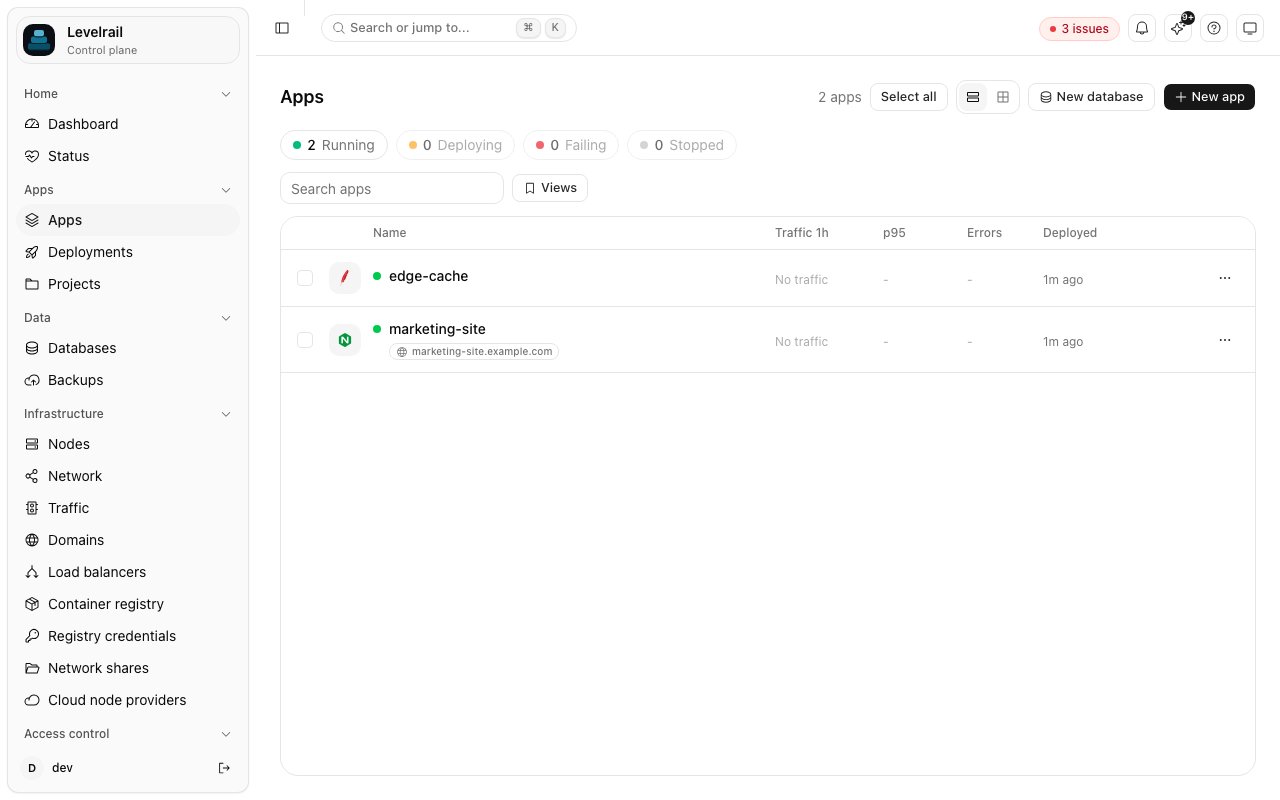 ## Why people look for a Coolify alternative
A node agent dials out to the control plane over mutual TLS and uses the Docker Engine API. Nothing shells out to the docker CLI, and managed servers need no inbound port.
Node-local metrics at 15 second resolution and full-text log search ship in the core. Deploy markers sit on the charts, so which deploy caused a spike is a visual answer.
Previous images stay pinned so garbage collection can never remove your rollback target. Traffic only cuts over once the new container passes a real readiness probe.
## Bring your apps with you
The importer reads your existing instance through its own HTTP API and never changes anything there. Run it with --dry-run first to see exactly what would be created.
```bash title="install, import, verify" theme={"dark"}
curl -fsSL https://levelrail.com/install.sh | sudo sh
# control plane running as a systemd service
levelrail-cli import platform coolify --url https://coolify.example.com --dry-run
# dry run: report only, nothing is written here or changed there
levelrail-cli import platform coolify --url https://coolify.example.com --only web,api
# apps and databases created, ready to deploy
```
## Coolify and Levelrail, side by side
Architecture and design choices, not a ranking. Coolify is a mature project with a wide template catalog.
| | Coolify | Levelrail |
| - | - | - |
| Server management | SSH from the control plane to each server | Agent dials out over gRPC with mTLS, talks to the Docker Engine API |
| Orchestration | Docker and Docker Compose per resource | Level-triggered reconciler: desired state in the database, converged continuously |
| Ingress | Traefik (Caddy also offered) | Caddy embedded in the control plane |
| Runs as | A web application with its own database | One control plane binary, SQLite in WAL mode, one agent binary per extra node |
| License | Open source | Apache 2.0, one edition, no paid tier |
[Read the full comparison](/comparison)
## Move over in four steps
One script checks the host, installs Docker if missing, and starts the control plane as a systemd service.
Point it at your Coolify URL with --dry-run. You get a report of what would be created. Nothing changes on either side.
Import all apps and databases or a subset with --only, then deploy and watch the readiness probe gate the cutover.
Keep Coolify running until the new setup has earned your trust, then switch your domains.
## Frequently asked questions
It covers the same job, deploying apps and databases to your own servers from a git push, but it is a different design, not a fork. A read-only importer brings apps and databases across, and the migration guide lists what maps and what does not.
Levelrail ships a catalog of 311 one-click templates, a sample of which is deployed by its end-to-end tests. Check that the services you need are covered, in either catalog, before moving.
Yes. Extra servers join with a one-time token and run a small agent that dials out to the control plane, so managed servers never open an inbound port. Enrollment, cordon and drain are verified against real Docker daemons.
Nothing. Levelrail is Apache 2.0 with one edition: SSO, audit logging, IAM and scheduled backups all ship in the same free binary.
Levelrail is in active pre-release development, and single node is the best tested path. Run it next to your current setup first, which the importer's read-only design makes safe.
## Try it next to your current setup
Import read-only, compare for a week, and keep what works. Open source, so you can read every line.
[Get started](/getting-started) | [View on GitHub](https://github.com/glincker/levelrail)
This documentation is built and hosted on [Mintlify](https://mintlify.com), a developer documentation platform.
## Why people look for a Coolify alternative
A node agent dials out to the control plane over mutual TLS and uses the Docker Engine API. Nothing shells out to the docker CLI, and managed servers need no inbound port.
Node-local metrics at 15 second resolution and full-text log search ship in the core. Deploy markers sit on the charts, so which deploy caused a spike is a visual answer.
Previous images stay pinned so garbage collection can never remove your rollback target. Traffic only cuts over once the new container passes a real readiness probe.
## Bring your apps with you
The importer reads your existing instance through its own HTTP API and never changes anything there. Run it with --dry-run first to see exactly what would be created.
```bash title="install, import, verify" theme={"dark"}
curl -fsSL https://levelrail.com/install.sh | sudo sh
# control plane running as a systemd service
levelrail-cli import platform coolify --url https://coolify.example.com --dry-run
# dry run: report only, nothing is written here or changed there
levelrail-cli import platform coolify --url https://coolify.example.com --only web,api
# apps and databases created, ready to deploy
```
## Coolify and Levelrail, side by side
Architecture and design choices, not a ranking. Coolify is a mature project with a wide template catalog.
| | Coolify | Levelrail |
| - | - | - |
| Server management | SSH from the control plane to each server | Agent dials out over gRPC with mTLS, talks to the Docker Engine API |
| Orchestration | Docker and Docker Compose per resource | Level-triggered reconciler: desired state in the database, converged continuously |
| Ingress | Traefik (Caddy also offered) | Caddy embedded in the control plane |
| Runs as | A web application with its own database | One control plane binary, SQLite in WAL mode, one agent binary per extra node |
| License | Open source | Apache 2.0, one edition, no paid tier |
[Read the full comparison](/comparison)
## Move over in four steps
One script checks the host, installs Docker if missing, and starts the control plane as a systemd service.
Point it at your Coolify URL with --dry-run. You get a report of what would be created. Nothing changes on either side.
Import all apps and databases or a subset with --only, then deploy and watch the readiness probe gate the cutover.
Keep Coolify running until the new setup has earned your trust, then switch your domains.
## Frequently asked questions
It covers the same job, deploying apps and databases to your own servers from a git push, but it is a different design, not a fork. A read-only importer brings apps and databases across, and the migration guide lists what maps and what does not.
Levelrail ships a catalog of 311 one-click templates, a sample of which is deployed by its end-to-end tests. Check that the services you need are covered, in either catalog, before moving.
Yes. Extra servers join with a one-time token and run a small agent that dials out to the control plane, so managed servers never open an inbound port. Enrollment, cordon and drain are verified against real Docker daemons.
Nothing. Levelrail is Apache 2.0 with one edition: SSO, audit logging, IAM and scheduled backups all ship in the same free binary.
Levelrail is in active pre-release development, and single node is the best tested path. Run it next to your current setup first, which the importer's read-only design makes safe.
## Try it next to your current setup
Import read-only, compare for a week, and keep what works. Open source, so you can read every line.
[Get started](/getting-started) | [View on GitHub](https://github.com/glincker/levelrail)
This documentation is built and hosted on [Mintlify](https://mintlify.com), a developer documentation platform.